February 24, 2026

10
min read
From Idea to Live: How to Build a Basic Business Website
Build your business website easily! Our 5-step guide to simple website creation helps you go from idea to live with AI. Ge...
Build your business website easily! Our 5-step guide to simple website creation helps you go from idea to live with AI. Ge...


Simple website creation is no longer reserved for tech experts or businesses with big budgets. Today, anyone can build a professional-looking website in hours, not weeks—thanks to drag-and-drop builders, AI-powered tools, and platforms designed specifically for beginners.
Quick Answer: To create a simple website, you need to:
The stakes are higher than you might think. Half of consumers say design heavily influences their opinion of a company. That first impression happens in seconds—and for most potential customers, it happens on your website.
Yet many business owners delay launching a site because they assume it requires coding knowledge, thousands of dollars, or months of work. The reality? Modern website builders have eliminated these barriers entirely. You can start with AI-generated content, customize professional templates with drag-and-drop tools, and go live the same day.
The key is understanding your options and choosing the right path for your business. Do you need a simple landing page? A portfolio to showcase your work? An online store? Each goal has a matching solution—and most are simpler than you expect.
I'm Ryan T. Murphy, founder of UpfrontOps, and over the past 12 years I've helped 32 companies build their digital presence from the ground up. Through countless website builds and redesigns—from scrappy startups to enterprise firms—I've seen how simple website creation can open up growth, especially when paired with smart automation and clean systems that actually work for your business.
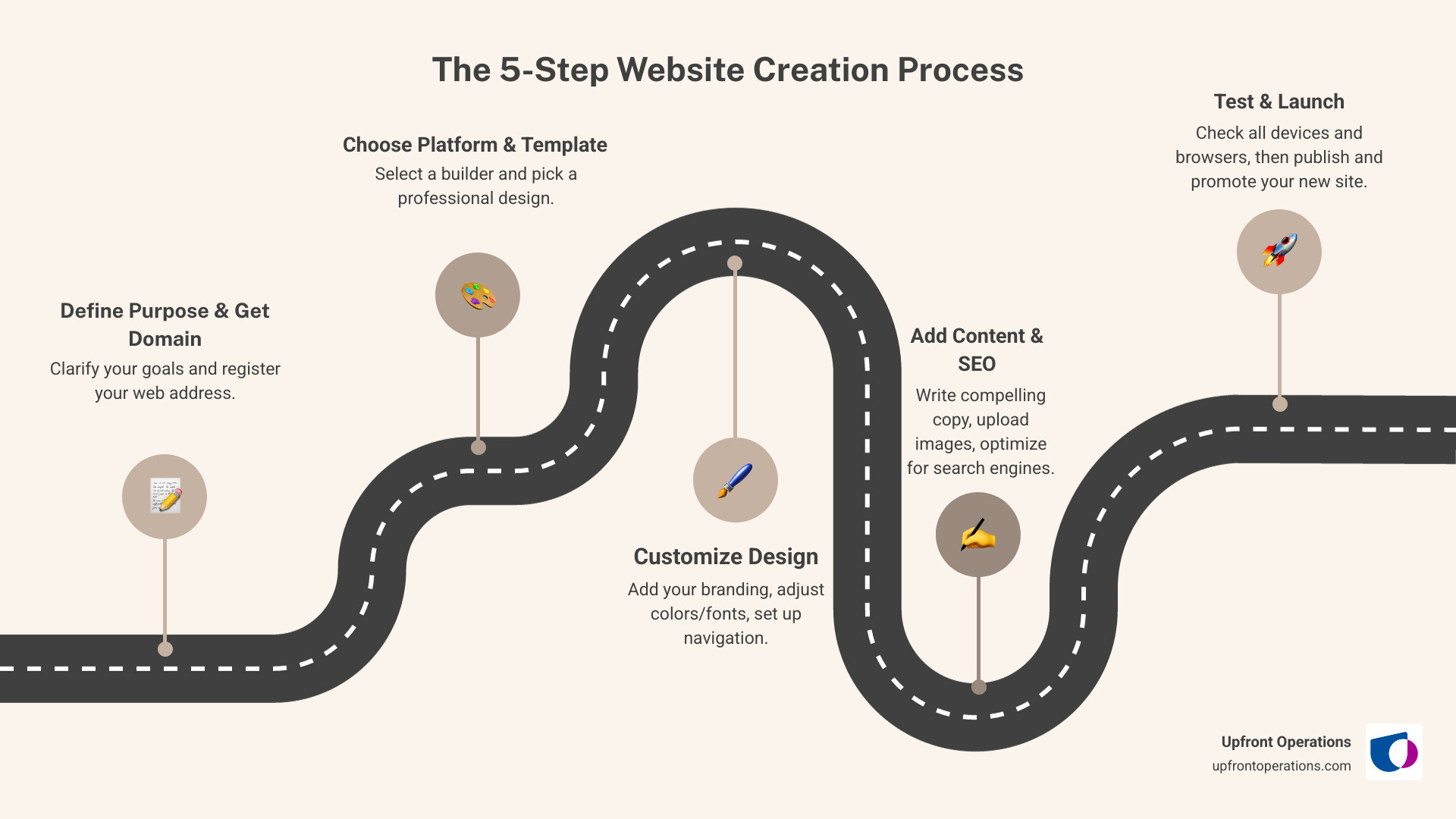
The 5-Step Website Creation Process: 1) Define Purpose & Get Domain - Clarify your goals and register your web address, 2) Choose Platform & Template - Select a builder like Wix or Squarespace and pick a professional design, 3) Customize Design - Add your branding, adjust colors and fonts, set up navigation, 4) Add Content & SEO - Write compelling copy, upload images, optimize for search engines, 5) Test & Launch - Check all devices and browsers, then publish and promote your new site.
Explore more about Simple website creation:
When starting on your simple website creation journey, one of the first big decisions you'll face is choosing the right tool for the job. Do you opt for a user-friendly website builder, a more robust Content Management System (CMS), or go all-in with coding from scratch? Each path offers a different balance of ease of use versus flexibility, and understanding these differences is crucial for finding the best fit for your business goals.
For most small businesses and solopreneurs in New York looking for simple website creation, website builders are the undisputed champions. These platforms are designed with beginners in mind, providing an all-in-one solution that bundles design, hosting, and often domain registration into one convenient package. Think of them as your personal website-building assistant, ready to help you craft a professional online presence without breaking a sweat.
The main benefits of using a simple website builder include:
Popular examples include Weebly, which boasts a powerful free website builder and seamless integration with Square for e-commerce, making it ideal for selling anytime, anywhere. Squarespace offers neat templates perfect for showcasing professional services, with integrated tools for service listings, booking, invoicing, and payment processing. Canva Websites even offers a free option for users to publish up to five live websites on a free domain, making it super accessible for quick projects. Webflow is another excellent no-code option, offering a visual design interface that automatically generates clean code, allowing you to build complex interactions and animations without coding headaches.
If you want to understand how these tools work under the hood and how they compare to traditional web technologies, you can also explore this general overview of web design for additional context.
If you need a bit more control and flexibility than a typical website builder offers, a Content Management System (CMS) like WordPress might be your go-to. WordPress, for example, powers a significant portion of the internet and offers immense customization potential.
With a CMS, you gain greater control over your site's functionality and design through a vast ecosystem of plugins and themes. However, this flexibility comes with a slightly steeper learning curve. While you don't necessarily need to code from scratch, managing a CMS often requires a more hands-on approach to updates, security, and sometimes, troubleshooting. Unlike most website builders, you'll typically need to arrange for separate web hosting and domain registration.
CMS platforms are excellent for businesses that anticipate needing advanced features, extensive blogging capabilities, or highly specific integrations down the line. They're also a favorite among content marketers who need robust tools for managing and distributing valuable content.
For more insights into creating compelling content, check out our guide on More info about content marketing.
If you would rather not handle any of this setup yourself, Upfront Operations can step in with on-demand microservices like Done For You Websites and Business Email Setup, giving you a professionally built CMS-based site without the technical overhead.
For those with a developer's mindset or highly unique requirements, coding a website from scratch provides ultimate control. This involves writing the core languages of the web: HTML for structuring content, CSS for styling, and JavaScript for adding interactivity.
While this path offers unparalleled customization and performance optimization, it demands significant technical skills and a considerable time investment. It's generally not the first choice for simple website creation for small businesses unless they have an in-house developer or a very specific, complex vision.
However, even within the coding world, there are tools that simplify the process. Static site generators like Hugo and Jekyll allow developers to build incredibly fast, secure, and flexible websites by generating static HTML files. Hugo, for instance, is known as "the world’s fastest framework for building websites" and is one of the most popular open-source static site generators. GitHub Pages even offers free hosting for static sites, making it a viable option for those comfortable with Git and basic web development.
If you're curious about the foundational elements of web development, you can Learn the basics of web development.
If coding from scratch feels overwhelming but you still want a highly optimized site, this is exactly where Upfront Operations’ on-demand support shines. Our team can translate your unique requirements into a custom-built site while you stay focused on running your business.
Here's a quick comparison to help you weigh your options:
| Feature | Website Builders (e.g., Wix, Squarespace) | CMS (e.g., WordPress) | Coding From Scratch (e.g., HTML/CSS, Jekyll) |
|---|---|---|---|
| Cost | Free to moderate monthly subscription | Free software, paid hosting/plugins | Free (your time), paid hosting/tools |
| Technical Skill | Very low to none | Moderate (some learning curve) | High (requires coding knowledge) |
| Maintenance | Handled by platform | Requires regular updates/security | Fully manual |
| Flexibility | Good (template-based) | Excellent (plugins, custom code) | Unlimited |
| Speed to Launch | Fast | Moderate | Slow (unless using static site generators) |
Now that you understand the different paths, let's dive into the practical steps for simple website creation. This process is designed to be straightforward, especially when using a website builder, ensuring you can get your business online quickly and effectively.

Before you even think about design, we need to clarify why your website exists. What are your website goals? Are you selling products, generating leads, showcasing a portfolio, or providing information? Who is your target audience in New York? What do they need from your site? A clear purpose will guide every decision you make. Don't be afraid to check out what your competitors are doing; not to copy them, but to understand what works and identify opportunities to stand out.
Next, it's time to choose your digital address: a domain name. This should be memorable, easy to spell, and ideally, reflect your business name. Common domain extensions like .com are always a safe bet, but newer options like .store or .biz can also be effective if they fit your brand. Many website builders offer domain registration directly, or you can use a separate registrar.
Finally, consider web hosting. This is where your website's files live on the internet. Most website builders include hosting as part of their subscription, offering a hassle-free, bundled solution. If you're using a CMS, you'll need to choose a separate hosting provider. Some platforms like GitHub Pages offer free hosting for static sites, which is a great option if you're comfortable with a bit of technical setup.
With your purpose defined and domain in mind, it's time to pick your website builder. We've discussed options like Wix, Squarespace, Weebly, and Canva. Look for key features that align with your needs:
Once you've chosen a builder, you'll be greeted with a gallery of professional website templates. This is where the fun really begins! Browse through the options and select a template that visually appeals to you and aligns with your brand's aesthetic. This is just a starting point; you'll customize it to make it uniquely yours. Many builders offer over 100 HTML5 responsive templates, providing a solid foundation.

When selecting, consider branding consistency. Does the template support your logo, brand colors, and desired fonts? Also, remember mobile-first design. Since nearly 70% of web traffic now comes from phones and tablets, ensuring your template looks great and functions perfectly on smaller screens is non-negotiable. Most modern templates are responsive, meaning they automatically adapt to different screen sizes.
Now for the creative part! This step is all about making your chosen template reflect your unique business. We'll focus on creating an intuitive site structure and a visually appealing design.
Think about your site structure and navigation menu. Your goal is to make it easy for visitors to find what they're looking for within three clicks or less. Create a sitemap to blueprint your pages. Essential web pages usually include:
Adding your logo is usually a simple upload, and then you can choose fonts and colors that match your brand identity. Most builders allow you to easily adjust these elements. The goal is to create a seamless user experience (UX) that is both professional and engaging. Half of consumers say design heavily influences their opinion of a company, so a clean, consistent design is paramount.
With your design in place, it's time to fill your website with compelling content. This includes text, high-quality images, and potentially video integration. When creating text, remember to make it scannable with clear headers, concise paragraphs, and bullet points. People often skim online, so get straight to the point!
As you add content, we'll also lay the groundwork for on-page SEO (Search Engine Optimization). This is how we help search engines like Google understand what your site is about, making it more likely to appear in relevant search results.
Many website builders come with built-in SEO tools, making this process much easier. For a deeper dive into attracting customers through valuable content, explore More info about inbound marketing.
You're almost there! Before you hit that "publish" button, thorough testing is essential. This ensures a smooth experience for all your visitors.
Once you're confident, it's time to launch! After launch, don't forget to submit your site to Google Search Console to help search engines index your pages.
But launching is just the beginning. Now, it's time to tell the world about your amazing new website!
By following these steps, you'll not only have a live website but one that's designed to help your business grow.
Launching your website is a huge accomplishment, but the journey doesn't end there. To truly make your simple website creation a success, we need to ensure it's performing optimally and continuously improving.
We can't stress this enough: your website must be mobile-friendly. With nearly 70% of web traffic now coming from phones and tablets, a site that doesn't adapt to smaller screens is effectively invisible to a huge portion of your potential audience.
Fortunately, most modern website builders and templates are designed with responsiveness in mind. This means your content and layout will automatically adjust to look great on any device, from a desktop monitor to the smallest smartphone. Always use your website builder's mobile preview tools to double-check how your site appears on different devices, and test it on actual phones and tablets if possible. A seamless mobile experience isn't just a nice-to-have; it's a critical component of user satisfaction and search engine rankings.
Even with the easiest tools, it's possible to stumble. Here are some common pitfalls we see businesses in New York make during simple website creation and how to avoid them:
Avoiding these mistakes will help your simple website punch above its weight and deliver real value to your business.
We often hear similar questions from business owners looking to get online. Let's tackle some of the most common ones.
Yes, absolutely! Many platforms like Wix, Weebly, and Canva offer free plans that allow you to build and publish a website without upfront costs. This is a fantastic way to test out an idea, create a temporary landing page, or get a basic online presence.
However, free plans come with limitations:
While great for getting started, for a serious business presence in New York, we generally recommend upgrading to a paid plan to open up custom domains, remove ads, and access more powerful features.
The costs for a simple website creation can vary widely depending on your chosen path and desired features.
It's an investment, but a worthwhile one for your business's visibility and credibility. For detailed information on our services and pricing options, you can visit More info about pricing.
Adding e-commerce functionality to your simple website is surprisingly straightforward with most modern website builders. Many platforms offer integrated e-commerce features that allow you to set up an online store with ease.
Whether you're selling handmade crafts or offering professional consulting services, adding e-commerce can turn your simple website into a powerful revenue generator.
From defining your purpose to hitting "publish," simple website creation has never been more accessible. We'veseen how modern tools empower small business owners and solopreneurs in New York to build a professional online presence without needing to become tech wizards. By choosing the right path—whether it's a user-friendly website builder, a flexible CMS, or even basic coding—and following our five-step guide, you can confidently transform your idea into a live, engaging website.
The value of a professional online presence cannot be overstated. It's your digital storefront, your 24/7 marketing tool, and often, the first impression you make on potential customers.
For those who want the results without the work, Upfront Operations offers the simplest path of all. Our on-demand microservices are designed for busy entrepreneurs. We can build your website and set up your business email for you, getting you live in record time. This isn't just about building a site; it's about providing game-changing sales operations support—supercharging your CRM management, lead nurturing, and pipeline optimization to help you close deals faster and scale with unstoppable momentum. Our model completely surpasses the value of traditional agencies and freelance platforms, delivering essential solutions custom to your needs.
Ready to take the leap and get your business online? Let us handle the heavy lifting.