Why Website User Experience Can Make or Break Your Business

Achieving a good user experience with a website starts with understanding that you have roughly two seconds to prove your site is worth a visitor's time. Miss that window, and the back button becomes your biggest competitor.
Here's what drives a strong website user experience:
- Fast loading speeds - 40% of visitors abandon pages that take longer than 3 seconds to load
- Mobile-first design - Over 60% of web traffic in the US now comes from mobile devices
- Clear navigation - Users should reach any key page within 3 clicks
- Accessible content - One in four adults in the United States lives with some form of disability
- Trust signals - HTTPS, contact info, and social proof reduce friction
- Strategic CTAs - Action-oriented language guides users toward conversion
Poor UX doesn't just frustrate visitors—it actively costs you money. Each additional second of load time can shave 7% off conversion rates, while users are five times more likely to leave if your mobile site isn't optimized. Google now uses your mobile version for indexing, so a clunky mobile experience means fewer people will even find you.
I'm Ryan T. Murphy, founder of Upfront Operations. Over the past 12 years, I've helped 32 companies redesign their digital experiences to open up millions in new revenue. Now, through our on-demand microservices, we make that same expertise accessible to businesses of all sizes, proving that achieving a good user experience with a website directly impacts your bottom line. I've seen website traffic multiply by 10X and sales cycles shrink by 28% when businesses get the fundamentals right.
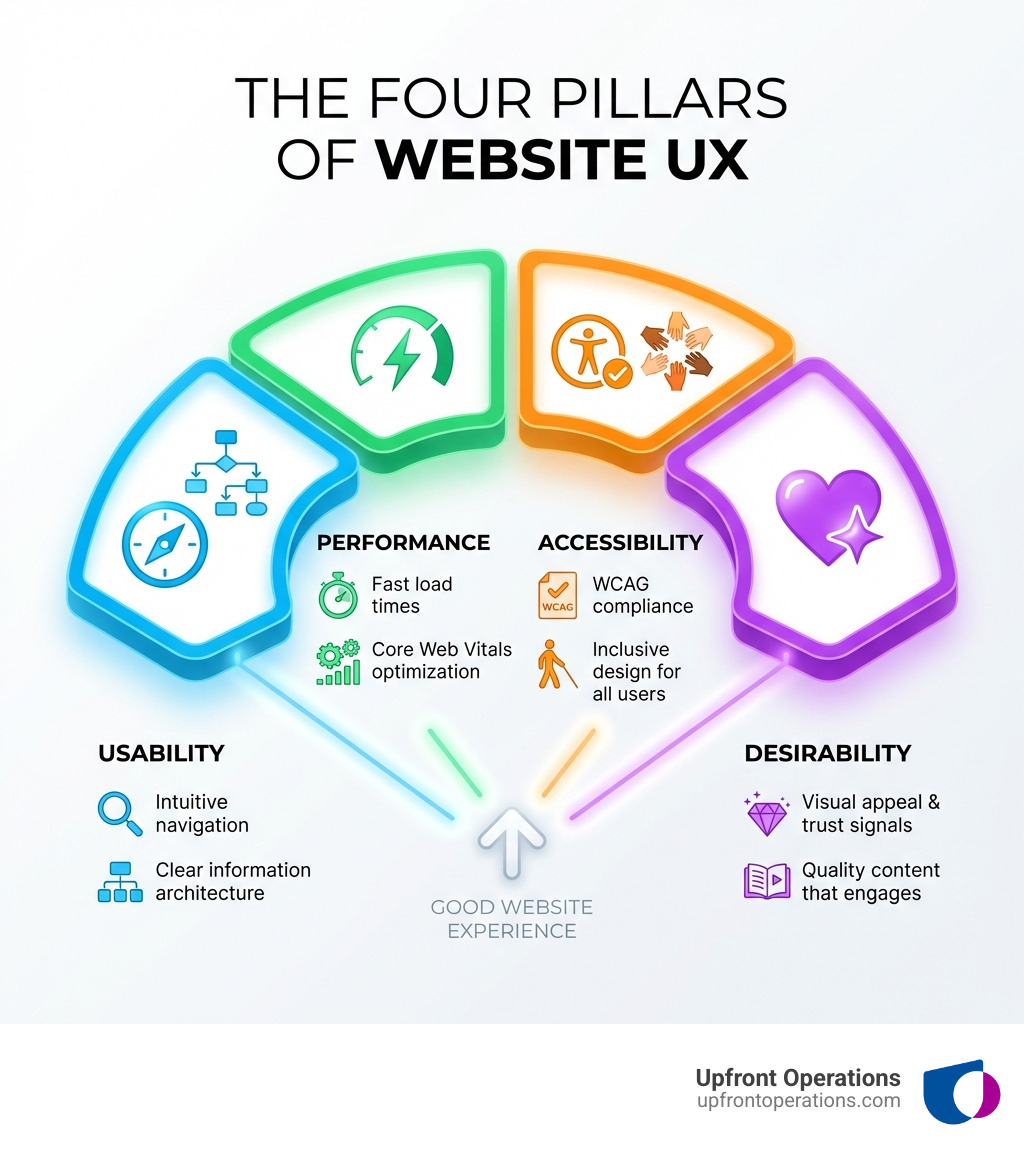
The Blueprint: Core Principles of User-Centric Design
At Upfront Operations, we believe that a great website isn't just about pretty pictures; it's a carefully crafted digital experience designed to meet user needs and business goals. Our on-demand website design and UX audit services are built on this philosophy. Think of it like building a house – you wouldn't start hammering nails without a blueprint, would you? The same goes for achieving a good user experience with a website. Our UX design process always starts with deep user research, uncovering the pain points, motivations, and goals of your target audience. We ask: What do they need to achieve on your site, and how will they feel when they encounter different pages? This foundational understanding allows us to create buyer personas that truly represent your customers.
The next step is to establish a logical information architecture. This is like being a librarian for your content, filing everything where your audience expects to find it, while also creating alternative paths for different journeys. Good UX design considers primary, secondary, and even tertiary audiences, ensuring everyone finds their way.
Visual hierarchy is another cornerstone. Humans process patterns first, details later. Size, color, contrast, and spacing act as road signs, guiding eye movements and helping users understand what's important and what to do next. When these cues align with your business goals, users naturally gravitate towards your key calls to action.
Consistency is key. A visitor should recognize your site in a split-second, whether they land on the homepage or a checkout page. Visual and behavioral consistency knits the whole experience together, lowers cognitive effort, and builds trust. Inconsistent colors, haphazard button styles, or rogue fonts can quickly erode credibility.
Finally, we leverage established UX design principles, including Jakob's Law of Internet User Experience. Jakob's Law reminds us that users spend 90% of their time on other sites, so they come primed with mental models of how websites should work. By leaning on these conventions, we reduce cognitive load and help users focus on their goals, not on decoding your interface.
How Clear and Intuitive Navigation Helps in Achieving a Good User Experience with a Website
Nothing frustrates a user more than getting lost on a website. Great navigation disappears into the background, making wayfinding feel instinctive. The first step to achieving a good user experience with a website is making navigation easy and intuitive. Visitors should be able to find what they're looking for within a few clicks.
Here’s how we ensure navigation is seamless:
- Simple Menu Structure: We use a clear and simple menu structure. Limit top-level items to 5-7 to avoid overwhelming users; overflow can live in a mega menu or footer.
- The 3-Click Rule: Any key page should be reachable in three interactions or fewer. This ensures users can quickly access essential information without unnecessary effort.
- Descriptive Labels: We use plain-language nouns for menu items (e.g., "Pricing," not "Investment Opportunities"). Descriptive and easy-to-understand labels, easily-identified icons or buttons help users quickly know where they need to go next.
- Logical Placement: The logo should be anchored top-left and link home. The primary menu belongs top-right or centered on mobile, consistent site-wide.
- Sticky Headers: These are great for mobile users, keeping navigation accessible as they scroll, but we always trim their height to avoid content creep.
- Breadcrumbs: For larger sites, breadcrumbs help users understand their current location and easily jump back a level.
- Footer Navigation: A comprehensive footer menu can house secondary paths, providing additional ways to explore the site.
- On-Site Search Bar: Incorporating a search bar is crucial. Users who search convert at a much higher rate, so treating internal search as a product in its own right has a high impact. Our On-Site Search Optimization microservice can turn your search bar into a powerful conversion tool by adding features like autocomplete, typo tolerance, and clear "no results" messaging.
The Role of Clean Layouts and Whitespace
Visitors don’t "read" web pages like novels; they scan, hop, and cherry-pick. If your layout doesn’t shout "start here," their eyes dart around, motivation slips, and the back button wins. This is why clean layouts and the strategic use of whitespace are vital for achieving a good user experience with a website.
- Readability and Scannability: We structure pages with the most important messaging at the top. Eye-tracking studies show an F-pattern on desktop and a quicker Z-pattern on mobile. We break text with descriptive H2/H3 headings every 250 words and use bullet lists for steps, specs, or benefits. Keep paragraphs to 2–3 sentences; one idea per line.
- User Comprehension: Using whitespace in designs increases visitor comprehension by almost 20%. It's not "empty space"; it's a silent organizer that groups related elements (Gestalt proximity) and shortens decision time (Hick's Law).
- Reduced Cognitive Load: Generous gutters and margins raise perceived quality and reduce scanning fatigue. We use an 8-point spacing grid for predictable increments in padding and margins.
- Highlighting CTAs: We reserve extra negative space around primary CTAs to draw focus without needing another color. Crowding the "fold" or overlaying text on busy images creates visual noise that sabotages clarity.
Your website is a virtual storefront, showcasing your products, services, and brand. The language you use and the visuals you present are paramount for achieving a good user experience with a website.
- Clear, Concise Language: Using clear and concise language is essential. It helps users quickly and easily understand content without complex jargon. We encourage a conversational tone, which helps establish a connection with users and makes them more likely to engage.
- UX Writing: This goes beyond mere copywriting. UX writing focuses on clarity, simplicity, and task-completion, guiding users smoothly through content and improving overall usability. Microcopy—those tiny strings of text like button labels or form hints—can hold more conversion power than hero headlines by clarifying outcomes ("Download PDF — 1 MB"), reducing anxiety ("No credit card needed"), or softening errors ("Let’s try that again—passwords don’t match").
- High-Quality Images and Videos: Providing high-quality images and videos is critical, especially for eCommerce. These visuals are often the only way for users to experience and engage with your offerings. High-quality visuals make a website look more professional and credible, increasing user trust and engagement. However, they must be optimized to load fast. Our Media Optimization microservice ensures your visuals are stunning without slowing your site down by using modern formats like WebP, serving vector icons as SVG, and enabling responsive images with
srcset.
Speed and inclusivity are non-negotiable for achieving a good user experience with a website. Google itself prioritizes these factors, making them crucial for both user satisfaction and search engine rankings.
Why a Mobile-First Approach is Essential for Achieving a Good User Experience with a Website
More than half of all web traffic comes from mobile devices, and users are five times more likely to leave your website if it isn't well-optimized for smaller screens. This makes a mobile-first approach absolutely essential.
- Google's Mobile-First Indexing: When Google indexes your site, it crawls both desktop and mobile versions. If your mobile version isn’t optimized, it becomes harder for customers to find you. Google evaluates Core Web Vitals primarily on mobile field data, so a slow or unusable smartphone layout can drag an otherwise solid site down the search engine results pages.
- Responsive Design: Our websites are designed to adjust seamlessly to different screen sizes, allowing users to access the site from any device – desktops, laptops, tablets, and smartphones. This means building with fluid CSS grids and percentage-based columns, and serving flexible images via
srcset. - Tap Target Size: We ensure tap targets (buttons, links) are at least 48 x 48 pixels, making them easy to interact with on touchscreens.
- Testing on Real Devices: While emulators in Chrome DevTools catch obvious issues, nothing beats testing on real devices across common breakpoints (e.g., 320px, 375px, 768px, 1024px) in both portrait and landscape modes.
Strategies for Lightning-Fast Website Speed
Click. Wait. Gone. When a visitor taps your URL, you have little more than two seconds to prove the site is worth their time. Nothing torpedoes engagement faster than a spinning loader.
- Impact of Loading Times: Real-world data shows 40% of visitors abandon a page that takes longer than three seconds to render, and each additional second can shave roughly 7% off conversion rates. Slow loading times remain one of the biggest UX issues.
- Core Web Vitals: Google bakes Core Web Vitals (Largest Contentful Paint - LCP, Interaction to Next Paint - INP, Cumulative Layout Shift - CLS) into its ranking algorithm. A slow site loses both traffic and trust. We focus on optimizing these metrics to ensure your site loads quickly, responds promptly to user input, and maintains visual stability.
- Reliable Hosting: Invest in reliable hosting. Cheap hosting often means overloaded servers and slow performance.
- Image Optimization: We optimize assets by compressing images and videos before uploading them, using modern formats like WebP or AVIF. Image Optimizer tools can speed up image load times and deliver just-in-time changes.
- Caching: Enabling caching tools or plugins can significantly reduce loading times by storing copies of your site's files closer to users.
- Content Delivery Networks (CDN): CDNs improve site speed by delivering cached content from servers closer to your customers, decreasing web and application load times.
- Minifying CSS/JS: Reducing the size of your CSS and JavaScript files by removing unnecessary characters can also boost speed.
- Performance Budgets: Setting performance budgets helps maintain speed targets over time. Our Website Speed Audit is a crucial on-demand microservice that identifies your current site speed and provides a clear roadmap for improvement.

Ensuring Website Accessibility for an Inclusive Environment
Website accessibility refers to the practice of designing and developing websites in a way that allows people with disabilities to access and use them easily. This includes visual, auditory, physical, or cognitive disabilities. Accessibility isn’t charity; it’s good business and, in many cases, a legal requirement. Inclusive design widens your market and reduces risk.
- WCAG Standards: We adhere to the Web Content Accessibility Guidelines (WCAG) standards, which detail how to provide individuals with disabilities equal access to services.
- Screen Readers and Keyboard Navigation: Ensuring your website is keyboard-accessible and compatible with screen readers is fundamental. This means using semantic HTML and ARIA (Accessible Rich Internet Applications) roles correctly.
- Alt-Text for Images: Providing descriptive alt-text for images allows screen readers to convey visual information to users with visual impairments.
- Video Transcriptions: For videos, we provide transcriptions and captions, benefiting users with hearing impairments or those in noisy environments.
- Color Contrast Ratios: Designers must ensure there is enough contrast on screen to make text legible (at least 4.5:1 for text, 3:1 for large headings) and avoid relying on color alone to convey important information.
- Automated and Manual Testing: We recommend starting with automated scans (like WAVE or Lighthouse's accessibility audit) and following up with manual checks. Our Accessibility Audit microservice provides a comprehensive review, combining automated tools with expert manual testing to ensure your site is truly inclusive.
Guiding Users, Building Trust, and Driving Growth
The goal of achieving a good user experience with a website is to guide users towards their objectives, build unwavering trust, and drive business growth. This means carefully crafting every interaction, from the first click to the final conversion.
Crafting Clear Calls to Action (CTAs) That Convert
Calls to action (CTAs) are essential parts of creating a positive user experience. They are prompts that encourage visitors to take a specific action, such as signing up for a newsletter, buying a product, or filling out a contact form. If well-designed, CTAs help increase conversions and drive more business.
- Guiding Users: CTAs help guide visitors towards the next step in their journey on your website.
- Action-Oriented Language: We make CTAs clear and concise, using action-oriented language like "Start Trial" (beats "Submit") or "Save My Seat" (adds motivation).
- Setting Expectations: Add time or cost cues where relevant (e.g., "Download PDF — 1 MB").
- Microcopy: Good microcopy clarifies outcomes, reduces anxiety, or softens errors, keeping momentum high. Write for humans, not legal teams—ditch jargon.
- Visual Prominence: CTAs should be prominently placed on relevant pages, using an accent color and sufficient whitespace to draw focus.
- A/B Testing CTAs: Regularly testing different CTA wording, placement, and design can reveal what resonates best with your audience. Our Conversion Rate Optimization (CRO) microservices include A/B testing to fine-tune your CTAs for maximum impact.
Here's a list of CTA best practices:
- Be Specific: Tell users exactly what will happen.
- Use Strong Verbs: "Get Started," "Learn More," "Download Now."
- Create Urgency/Scarcity (if appropriate): "Limited Time Offer," "Enroll Today."
- Highlight Benefits: "Boost Your Sales," "Improve Your Workflow."
- Ensure Visual Contrast: Make it stand out from the rest of the page.
- Place Strategically: Where the user is ready to take the next step.
- Keep it Concise: Ideally 3-5 words.
- Test, Test, Test: A/B test variations to optimize performance.
Building Trust and Reducing User Frustration
Visitors won’t hand over money—or even an email address—if they sense the slightest whiff of risk. Trust is a non-negotiable pillar of good UX. Research shows people make snap judgments in 50 milliseconds.
- Easy-to-Find Contact Info: A website that lacks clear and easy-to-find contact information can be frustrating. We make it easy for visitors to contact you by prominently displaying your phone number and email address, preferably in the header or footer sections.
- Security Signals: An HTTPS padlock in every browser bar is a must. Visible SSL and trust badges also reassure users. We ensure all platforms, plugins, and dependencies are patched weekly and use strict security headers.
- Social Proof: Unedited customer testimonials, star ratings, and trusted reviews can boost conversions significantly. 92% of B2B buyers are more likely to purchase after reading a trusted review.
- Clear Error Messages: Nothing is more frustrating than cryptic error messages. We design for immediate, plain-English feedback that explains what went wrong and how to fix it, preserving user input and highlighting the exact field.
- Streamlined Forms and Checkout: A visitor ready to sign up or buy is at the tipping point. Streamlining this process is crucial. Our Checkout Optimization microservice trims forms to essentials, implements real-time validation, and simplifies the payment process with options like guest checkout to reduce cart abandonment.
- Password Retrieval Process: Optimize the password retrieval process. Include a "Did you forget your password?" button prominently from the start, not hidden after failed login attempts. And for logins, we use Javascript or Ajax validation to immediately alert users to errors (e.g., "name@domain.con" vs. ".com") instead of reloading the page.
How to Use Feedback and Testing for Continuous Improvement
Even with extensive pre-launch testing, bugs still appear once the site is live. Your customers often spot them first! Regular testing and feedback are vital for achieving a good user experience with a website and ensuring it remains top-notch.
- Collecting User Feedback: While tools like Google Analytics show what users do, only feedback explains why they leave, struggle, or convert. We encourage asking for feedback directly.
- Customer Effort Score (CES): A relevant KPI for measuring user experience, CES asks how easy it was for visitors to complete a task. Always include an open comment field so they can explain their score.
- Feedback Forms: On pages with complex information or high drop-offs, a simple "Did you find what you need?" question with an open comment field can provide clear direction.
- User Experience Surveys: For more in-depth feedback on design, products, or brand perception, surveys are invaluable.
- Analytics vs. Feedback: Analytics shows what happened; feedback reveals why. Combining both gives you a complete picture.
- Usability Testing: Guerrilla tests in a café, five-minute unmoderated tasks, and session recordings (like Microsoft Clarity) quickly surface friction.
- Identifying Pain Points (80/20 Rule): The Pareto Principle states that 20% of inputs create 80% of outcomes. Applied to UX, a handful of pages or bugs create the lion's share of frustration. Our UX Audit service dives into your analytics, reviews support tickets, and uses session recordings to spot recurring complaints, plotting findings on an Impact x Effort matrix to prioritize fixes.
- Iterative Design: Your website is a living product, never a set-and-forget brochure. Browsers, devices, and customer expectations shift constantly. We advocate for continuous iteration:
- "Test, Learn, Build": Slot this trio into each sprint: low-fidelity prototype, five-user test, rapid refinement.
- Measure UX with KPIs: Track quantitative metrics (Time to Interactive, task-success rate, conversions, bounce, NPS) and qualitative inputs (SUS surveys, open-text comments). Benchmark against industry medians and set clear objectives.
- Experimentation Culture: Treat every idea as a hypothesis. Run A/B tests and ship or scrap based on data.
- Cross-Functional Ownership: Nominate a cross-functional squad to own the UX backlog. This shared ownership makes continuous improvement a habit.
Conclusion
Achieving a good user experience with a website isn't a one-time project; it's an ongoing commitment to your users and your business's success. We've explored the core pillars: a solid blueprint built on user research, intuitive navigation, clean layouts, clear language, and high-quality media. We've also highlighted the critical role of performance and accessibility, ensuring your site is fast, responsive, and inclusive for all. Finally, we've discussed how guiding users with clear calls to action, building trust through transparency and security, and continuously improving through feedback and testing are essential for driving growth.
A seamless experience translates directly into higher conversions, stronger customer loyalty, better engagement, and improved brand perception. Your website is a dynamic, living product that constantly evolves with user expectations and technological advancements.
At Upfront Operations, we deliver essential and simple microservices on-demand, including expert website design and optimization. Whether you're a small business or a solopreneur in New York looking for a high-performing website that truly connects with your audience, or a larger company needing specialized support to refine your digital presence, we're here to help.
Learn how our on-demand website services can transform your user experience.