February 19, 2026

10
min read
How to Set Up Your First Remarketing Campaign (and Why You Should)
Set up your remarketing campaign setup easily! Re-engage visitors, boost conversions & ROI with our step-by-step guide to ...
Set up your remarketing campaign setup easily! Re-engage visitors, boost conversions & ROI with our step-by-step guide to ...
Remarketing campaign setup is the process of re-engaging website visitors who didn't convert on their first visit. Here's the quick-start process:
Research shows that only 2-4% of website visits result in a conversion. That means 96-98% of your potential customers leave without taking action. They browse, they add items to their cart, and then they vanish.
But they aren't lost forever. Remarketing gives you a second, third, and fourth chance to bring them back.
It works by using a tracking tag on your site to show targeted ads to past visitors as they browse other websites, watch YouTube, or scroll social media. It’s a powerful way to stay top-of-mind and guide them back to your checkout page. The results are compelling. Sierra Trading Post saw a 5x increase in conversions with dynamic remarketing because it targets warm leads who just need the right nudge.
I'm Ryan T. Murphy, founder of Upfront Operations. For 12 years, I've helped companies streamline marketing operations, setting up remarketing campaigns that cut wasted ad spend and boost conversions. This guide will walk you through every step.
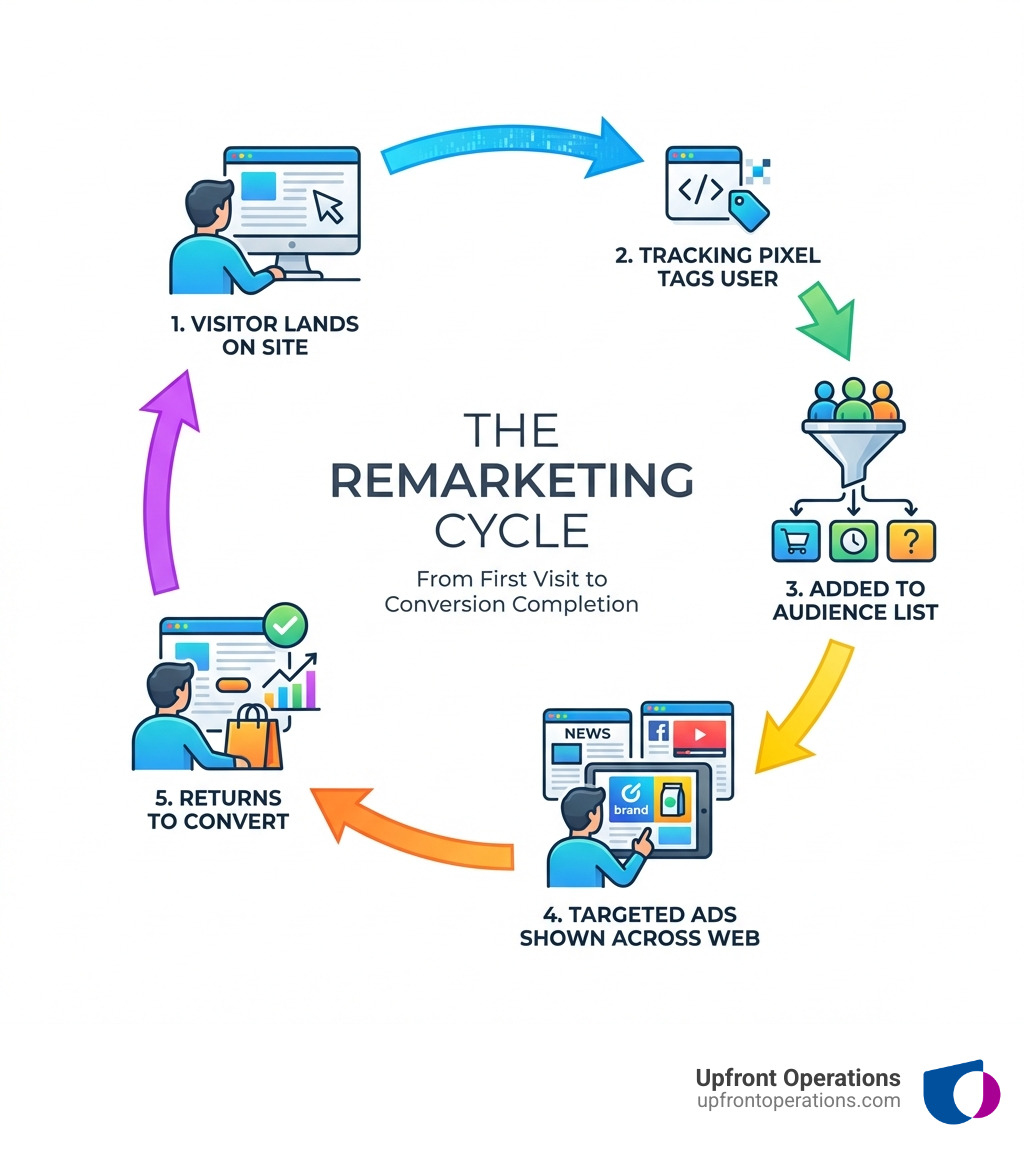
Remarketing saves potential sales from the abyss of forgotten browser tabs. It’s a digital marketing strategy that shows targeted ads to people who have already visited your website or app—a friendly reminder placed where they already spend their time.
The importance of remarketing can't be overstated. It's a game-changer for growth because it delivers:
Given that most websites convert only 2 to 4 percent of traffic, remarketing is essential for nurturing almost-conversions into actual sales and ensuring no interested visitor slips away.
Before diving into your remarketing campaign setup, it's crucial to know the tools available in Google Ads and Google Analytics. This will help you choose the right strategy for your goals.
Google offers a variety of remarketing options to fit different business goals:
The key difference is personalization. Standard remarketing is great for general brand recall, while dynamic remarketing is a conversion powerhouse for businesses with product or service catalogs, as it requires a data feed to show specific items.
| Feature | Standard Remarketing | Dynamic Remarketing |
|---|---|---|
| Purpose | General brand recall, remind about website visit | Personalized product/service reminders, drive specific conversions |
| Ad Content | Generic display ads, static images, text | Ads featuring specific products/services viewed by user |
| Personalization | Low (same ad for all list members) | High (ad content custom to individual browsing history) |
| Key Requirement | Remarketing tag on website | Remarketing tag with custom parameters + product/service data feed |
| Ideal For | Service-based businesses, general branding, simple funnels | E-commerce, travel, real estate, automotive (businesses with catalogs) |
| Complexity | Lower | Higher (due to data feed management) |
| Conversion Impact | Good for re-engagement, general conversions | Excellent for direct conversions, abandoned carts |
For a service like our on-demand web and ad setup, standard remarketing is effective. For an e-commerce store, dynamic remarketing is essential for showing visitors the exact products they viewed.
Mastering these concepts will boost your remarketing:
It's time to get practical. This step-by-step guide will walk you through your remarketing campaign setup in Google Ads. If the technical side feels overwhelming, our on-demand microservices, like our web and ad setup service, can get these foundations right for you without the headache.
The first step is placing a tracking tag on your website. This code allows Google to collect visitor data for your remarketing lists. While you can use the Google Ads tag or Google Analytics 4 (GA4) tag, we strongly recommend using Google Tag Manager (GTM).
Using Google Tag Manager (GTM):
GTM simplifies tag management. The basic process is:
Google Ads Remarketing tag.Conversion ID from your Google Ads account.All Pages to build a comprehensive visitor list.Conversion Linker tag firing on all pages for accurate tracking.For dynamic remarketing, you'll also need to implement event snippets (e.g., add_to_cart, purchase) with custom parameters that pass product data to Google. This is more complex but essential for showing personalized ads.
With tagging in place, build your audience lists in the Google Ads Audience manager or Google Analytics 4. Don't just target "all visitors." Create high-intent segments for better results.
Creating Lists in Google Ads:
Go to Audience manager > Your data segments and create new lists based on user behavior. Use URL rules to define your segments. For example:
/cart in the URL but did NOT visit a page with /order-confirmation.Creating Audiences in GA4:
For more advanced segmentation, use GA4. After linking it to Google Ads, you can create audiences based on events, user properties, or sequences of actions (e.g., users who view_item then add_to_cart but did NOT purchase). These audiences will automatically appear in Google Ads for targeting.
Now, let's create the campaign in Google Ads.
+ New campaign and choose a goal like Sales or Leads.Display for most remarketing campaigns.Maximize Conversions or Target CPA (Cost Per Acquisition) to let Google's AI optimize for your goal.Audiences and select the remarketing lists you created in Step 2. Be sure to exclude lists of converted users (like "Past Purchasers") to avoid wasted spend, unless you have a specific cross-sell strategy.Congratulations! Your remarketing campaign is now live. For businesses needing a robust web presence to support these ads, our on-demand website setup service ensures your landing pages are perfectly optimized from day one.
Launching your campaign is just the beginning. Continuous optimization and measurement are what open up its full potential and maximize your return on investment.
Refine your campaigns with these ongoing best practices:
For businesses that prefer to focus on their core operations, our on-demand campaign management services handle this continuous optimization for you, ensuring your budget is always spent effectively.
What gets measured gets managed. Track your success and stay compliant.
Here are answers to some of the most common questions we hear about remarketing.
Absolutely. For small businesses, remarketing is one of the highest ROI strategies available. It maximizes the value of your existing website traffic by re-engaging interested visitors, which is far more cost-effective than constantly chasing new, cold leads.
This depends on your sales cycle. A 30-90 day membership duration is effective for most products. For high-value items or services with longer consideration periods, you can extend this up to 540 days. It's always best to test and see what works for your specific business.
RLSA lets you customize your search campaigns for people who have previously visited your site. It's a powerful feature that allows you to:
We've covered the A-to-Z of remarketing campaign setup, from the "why" to the "how." The key takeaways are:
Setup is just the start. Continuous optimization and measurement are what drive long-term ROI. And throughout it all, maintaining privacy compliance and transparent user consent is paramount.
For businesses that want to leverage the power of remarketing without the technical overhead, Upfront Operations delivers game-changing sales operations support. We offer on-demand microservices like our web and ad setup service, as well as elite fractional sales operations experts for larger companies. We're here to help you close deals faster and scale with unstoppable momentum.
Don't let those valuable prospects slip away. Explore our full range of services to supercharge your growth and let us help you bring them back!