March 16, 2026

10
min read
How to handle leads in Salesforce without losing your mind
Master the Salesforce lead management process: capture, qualify, convert leads efficiently with AI, Flows, and best practi...
Master the Salesforce lead management process: capture, qualify, convert leads efficiently with AI, Flows, and best practi...

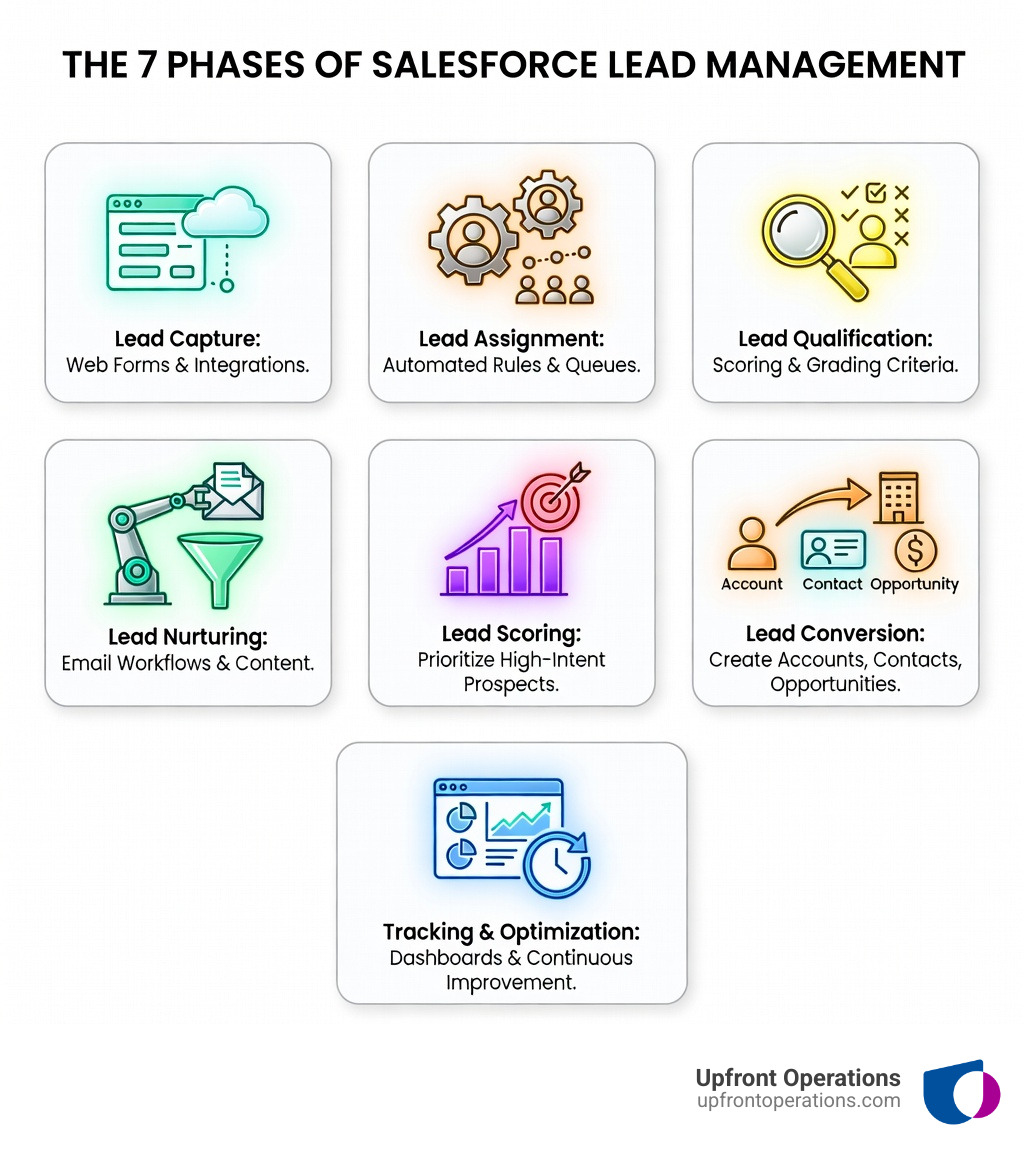
The Salesforce lead management process is the structured workflow that takes prospects from first contact through qualification, nurturing, and conversion into customers. It involves capturing leads through web forms and integrations, routing them to the right sales reps using assignment rules, scoring and qualifying based on engagement and fit, nurturing through automated workflows, and finally converting qualified leads into Accounts, Contacts, and Opportunities.
The 7 core stages of the Salesforce lead management process:
When done right, lead management builds trust through personalization—and research from McKinsey shows that when people feel understood, purchase likelihood increases by 40%. When done wrong? You're looking at dropped leads, frustrated sales reps, and a pipeline that leaks revenue like a sieve.
The reality is brutal: poor data quality costs businesses about $700 billion annually, and B2B companies lose up to $1 trillion from sales and marketing misalignment. Your leads are either being nurtured through a tight, efficient process—or they're falling into a black hole between marketing and sales.
Most mid-sized businesses struggle with the same pain points: inconsistent follow-ups, manual routing that wastes hours each week, duplicate records cluttering the CRM, and leads that go cold because no one knows who should follow up. The median B2B sales cycle is already 2.1 months—you can't afford to add friction with a broken lead process.
I'm Ryan T. Murphy, and over the past 12 years I've rebuilt the Salesforce lead management process for 32 companies, helping them cut sales cycles by up to 28% and unlock millions in new revenue through clean data, smart automation, and workflows that actually work. Whether you need on-demand support for CRM management, lead scoring setup, or full sales operations overhaul, the key is building a system that removes friction—not adds it.
Discover more about salesforce lead management process:
Before we can automate anything, we have to understand the "business card" of Salesforce: the Lead object. In the Salesforce lead management process, a Lead is a prospect who has shown interest but hasn't been qualified for a specific deal yet. Think of it as a temporary container for data.
Once a lead is qualified, it undergoes a transformation. We convert that Lead into three distinct objects:
One of the biggest mistakes we see in New York sales teams is treating Leads and Contacts as the same thing. They aren't.
| Feature | Lead | Contact |
|---|---|---|
| Stage | Unqualified prospect | Qualified individual |
| Object Relationship | Standalone | Linked to an Account |
| Purpose | To determine interest/fit | To manage an ongoing relationship |
| Data Quality | Often "dirty" or incomplete | Verified and high-quality |
According to McKinsey research on the impact of personalization, getting this right is non-negotiable. If you treat a long-term customer (Contact) like a brand-new stranger (Lead) because your data is siloed, you lose that 40% purchase likelihood boost. Revenue operations is all about breaking down these silos so that your marketing and sales teams share a single source of truth.
If your Salesforce lead management process starts with manual data entry, you've already lost. We want leads to flow in automatically. Salesforce provides "Web-to-Lead" forms that allow you to capture up to 500 leads per day directly from your website.
However, capturing them is only half the battle. You have to get them to the right person—fast. This is where Lead Assignment Rules and Queues come in.
At Upfront Operations, we often see teams wasting five or more hours a month just manually reassigning leads. By implementing Round Robin distribution, we ensure a fair and immediate split of prospects. If you're struggling to keep up with the volume, our CRM management services can help you build these rules in hours, not weeks. Lead velocity—the speed at which a lead moves through your pipeline—is the #1 indicator of sales success.
The real magic happens with Salesforce Flow Builder. This is the engine that allows us to automate complex tasks without writing a single line of code.
For example, we can build a Flow that says: "When a Lead Status changes to 'Working,' automatically create a Task for the rep to call them within 2 hours." We can even integrate with Slack to send real-time notifications to the sales channel the moment a high-value lead fills out a form.
Automation doesn't just save time; it ensures consistency. It prevents that "floating on an ice patch with the penguins" feeling that cold leads get when no one reaches out for three days.
Not all leads are created equal. Some are ready to buy today; others are just "kicking the tires." To manage this, we use Lead Scoring and Lead Grading.
When a lead hits a specific threshold (let's say a score of 100), they are marked as "Sales Ready." This alignment between marketing and sales is the "number one lever for growth" according to 85% of business leaders.
Ignoring data quality here is dangerous. Research on the business cost of poor data quality shows that dirty data leads to skewed reporting and wasted resources. By using Einstein GPT and predictive modeling, Salesforce can now analyze your historical data to tell you which leads are actually most likely to convert, improving your forecasting accuracy by up to 35%.
The conversion moment is where many organizations trip up. To keep your data clean, you must master Account Matching and Duplicate Management.
Before you click "Convert," Salesforce should check if that company already exists in your system. Pushing a new lead to an existing account prevents you from sending "introductory" emails to a company that's been your customer for five years.
Key conversion steps:
Maintaining data hygiene at this stage is what separates elite sales teams from those who spend all day cleaning up Excel sheets.
As we look toward 2025, the Salesforce lead management process is becoming "agentic." Salesforce's new Agentforce platform introduces autonomous AI agents that can handle multi-step tasks without a human intervention.
Imagine an AI agent that doesn't just score a lead but actually reaches out via email to schedule a meeting based on the lead's behavior, then updates the Salesforce record and notifies the rep. This can reduce administrative overhead by up to 40%.
Combined with Einstein GPT, which can draft personalized follow-up emails in seconds, and Predictive Analytics that refine your sales strategy in real-time, the "admin" part of sales is slowly disappearing. This allows your team to focus on what they do best: building relationships and closing deals. If you're looking to implement these advanced AI features, check out our sales operations pricing for fractional expert support that keeps you ahead of the curve.
A Lead is an unqualified prospect (like a business card you just picked up). A Contact is a qualified individual who is part of an Account you are actively managing or selling to.
Use Salesforce's built-in Duplicate Rules and Matching Rules. You can set these to "Block" duplicates from being created or "Alert" the user that a similar record already exists.
Einstein Lead Scoring uses AI to look at your past successful conversions and identifies patterns. It then scores new leads based on how closely they match those patterns, allowing sales reps to prioritize the hottest prospects first.
The Salesforce lead management process shouldn't be a source of stress. By mastering the core objects, automating your routing with Flow, and embracing AI-driven scoring, you can turn your CRM from a data graveyard into a revenue engine.
At Upfront Operations, we specialize in making this transition seamless. Whether you need a quick fix like a new website or business email setup, or elite fractional sales operations experts to overhaul your entire pipeline, we're here to help you scale with momentum.
Our mission is to simplify the complex. We believe that when your operations are "upfront" and transparent, your growth becomes unstoppable.
Supercharge your CRM management today and stop letting your best leads slip through the cracks. Learn more about our mission and how we're helping New York businesses win.