April 9, 2026

10
min read
8 Ways to Master Automated Follow-up Emails Today
Master Automated follow-up emails: 8 strategies, timing tips, personalization & pitfalls to boost sales conversions today.
Master Automated follow-up emails: 8 strategies, timing tips, personalization & pitfalls to boost sales conversions today.

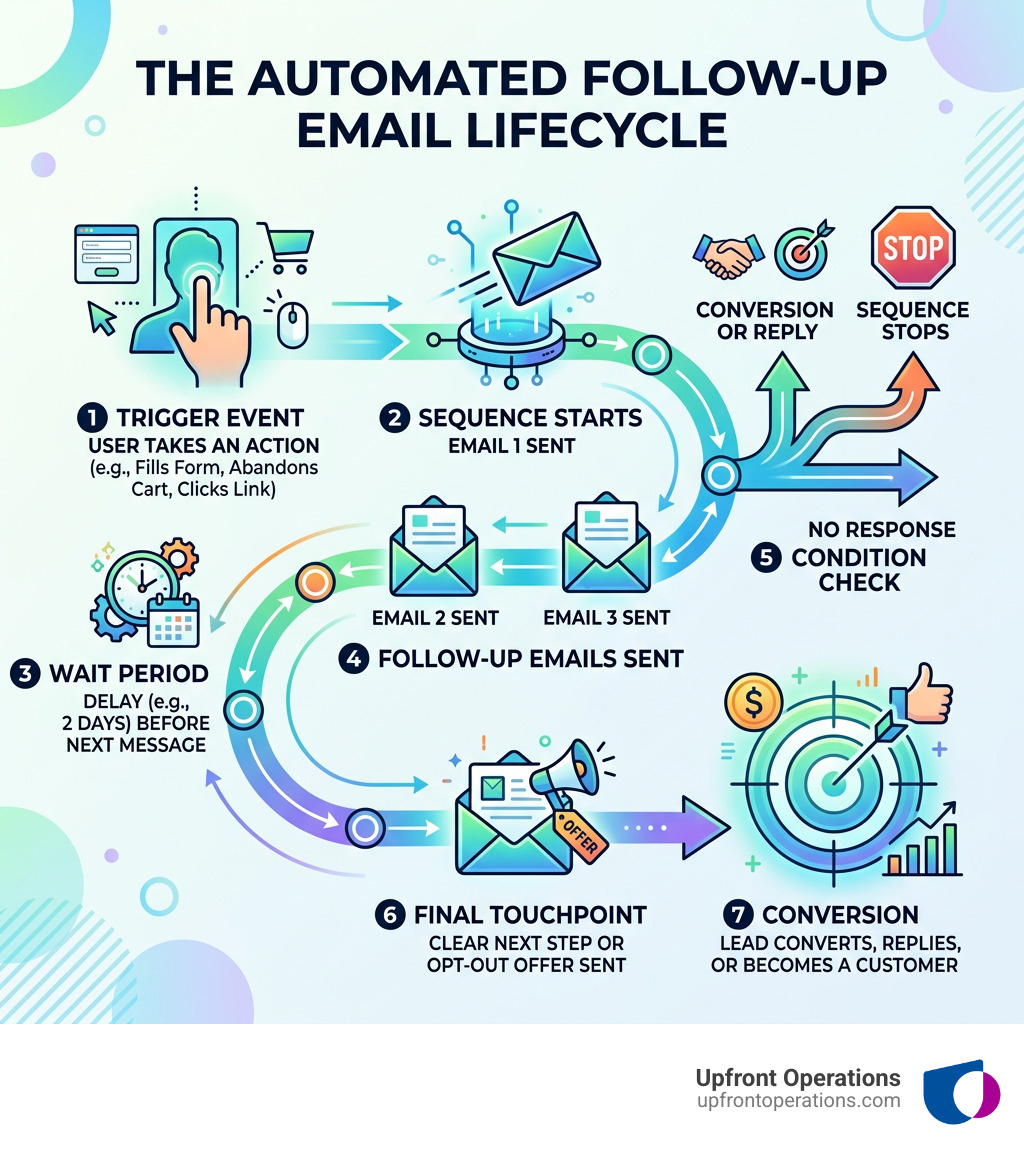
Automated follow-up emails are pre-scheduled or trigger-based messages sent to leads and customers automatically — without manual effort — to keep conversations moving and deals from going cold.
Here's how they work at a glance:
Most deals don't fall apart because a prospect lost interest. They fall apart because no one followed up — or followed up too late. For busy sales teams juggling dozens of leads at once, that's an easy mistake to make.
The good news? Automation fixes it entirely.
I'm Ryan T. Murphy, founder of Upfront Operations, and over the past 12 years I've helped 32 companies implement automated follow-up emails as part of broader sales systems that cut wasted time and unlock real revenue. In the sections ahead, I'll walk you through exactly how to master them — no fluff, just what works.
Automated follow-up emails word roundup:
In the business landscape of New York, waiting even a few hours to respond to a lead can be the difference between a closed deal and a missed opportunity. Research consistently shows that automated follow-up emails significantly increase response rates by keeping your brand at the forefront of a prospect's mind.
When we look at the ROI of email marketing, the numbers are staggering—some estimates suggest a return of $44 for every $1 spent. However, that ROI is only achievable if your outreach is consistent. Humans are forgetful; we get distracted by meetings, coffee runs, and the sheer volume of our inboxes. Automation never forgets. It ensures that every lead who downloads a white paper or visits a pricing page receives a timely, professional nudge.
Beyond just saving time, these sequences allow for sophisticated lead nurturing. By automating the "busy work" of initial follow-ups, your sales team can focus their energy on high-value interactions that require a human touch. At Upfront Operations, we see this as the ultimate force multiplier for small businesses and scaling enterprises alike.
To get started, you need the right engine. Different platforms offer varying levels of complexity depending on your business size and needs.
| Feature | HubSpot | Mailshake | Pipedrive |
|---|---|---|---|
| Primary Use | All-in-one CRM & Marketing | Cold Outreach Specialist | Sales Pipeline Management |
| Trigger Depth | High (Web visits, ads, forms) | Medium (Replies, clicks) | High (Deal stage changes) |
| Ease of Use | Moderate | Very High | High |
| Best For | Scaling Mid-market | Sales Development Reps | Small to Mid-sized Sales Teams |
If you are a solopreneur or a small team in New York, you might not need a massive enterprise suite. You can start with simple microservices like a professional Auto Follow Up for Gmail™ extension. This tool allows you to set simple "if no reply" rules directly from your inbox, boasting a 4.9-star rating from users who need persistence without the complexity of a full CRM.
For larger teams, we often recommend an on-demand CRM setup. Whether it’s configuring HubSpot workflows or Pipedrive automations, the goal is to ensure your automated follow-up emails are integrated with your actual sales data. We also provide business email microservices to ensure your sending infrastructure is rock solid before you ever hit "send."
Mastering automation isn't just about turning it on; it's about the strategy behind the clicks. Here are eight ways to ensure your emails actually get read and acted upon.
The most effective emails are those that feel relevant to what the recipient is doing right now. Instead of sending a generic blast, use specific triggers to launch your sequences:
One technical hurdle many face is HubSpot automated email authentication. Ensuring your emails are sent from an authenticated domain is critical. Without proper SPF and DKIM records, your carefully crafted triggers will just result in emails landing in the spam folder.
Timing is a delicate balance. Send too many emails, and you’re a nuisance; send too few, and you’re forgotten.
The consensus for a standard nurture sequence is between 2 to 5 emails. For high-intent actions like an abandoned cart, the first email should go out within a 1-2 hour window. For more general lead nurturing, space your emails out—perhaps 2 days after the initial contact, then 4 days, then a week.
Using "Wait nodes" in your automation software allows you to build these delays. The goal is to avoid "audience fatigue" by respecting the recipient's time while remaining persistently present.
We’ve all seen the "Hi {First_Name}" emails. Modern prospects see right through them. To truly master automated follow-up emails, you must use personalization tokens that reflect behavior and pain points.
If a lead downloaded an ebook on "Sales Operations," your follow-up should mention that specific topic. If they are in the "Real Estate" industry, your automation should pull in a case study relevant to that sector. Dynamic adjustment means the email content changes based on the data in your CRM. This makes the automation feel like a 1-to-1 conversation rather than a 1-to-many broadcast.
Everyone sends emails on Tuesday mornings at 10:00 AM. This creates a "Midweek Traffic Jam" where your message is buried under fifty others.
To stand out, try contrarian scheduling:
Another pro tip: stagger your send times to "odd minutes" (like 10:07 AM or 2:13 PM). This avoids the look of a batch-processed automated message and feels more like a human just hit send.
Relying solely on email is a "losing game" in an era of AI-generated noise. The most successful sequences use a multi-channel approach over a 22-25 day cadence.
Your automation should include "tasks" for your sales reps. For example:
This "surround sound" approach ensures that even if they miss your email, they see your brand elsewhere.
Your subject line has one job: get the email opened. Avoid jargon and "salesy" words like "Urgent" or "Free." Instead, aim for clarity or continuity, such as "Following up on [Previous Topic]" or "Question about your [Specific Goal]."
Inside the email, stick to a single offer. If you ask them to read a blog post, watch a video, and book a call, they will likely do none of those things. Use "micro-closing"—asking for a small, low-friction commitment like a 5-minute chat—to lead them toward the eventual sale.
You can write the best email in the world, but if it doesn't reach the inbox, it's useless. Deliverability is the backbone of automated follow-up emails.
Ensure you have your SPF, DKIM, and DMARC records set up correctly. Use your own sending domains rather than managed domains provided by your ESP. Also, keep an eye on "graymail suppression"—this is a feature in tools like HubSpot that stops sending to contacts who haven't engaged in a long time, protecting your sender reputation.
Automation is not "set it and forget it." You must regularly review your performance insights.
A/B testing is your best friend here. Test two different subject lines or two different wait periods to see which performs better, then iterate.
Even experts make mistakes. One of the biggest is sounding too robotic. If your email reads like a legal contract, people will hit delete. Use a warm, conversational tone.
Another pitfall is being too aggressive. Following up every single day will get you marked as spam faster than you can say "unsubscribe." Lastly, don't over-rely on automation. For high-value, late-stage deals, a personal, manually written email from a human will always outperform a sequence.
At Upfront Operations, we help businesses find this balance. About Upfront Operations is really about the marriage of elite technology and human strategy.
Most research suggests a cadence of 2 to 5 emails for marketing nurtures. For cold sales outreach, some experts recommend up to 8-12 touchpoints over a month, including non-email channels.
Yes! While they don't have robust built-in "sequences," you can use extensions like cloudHQ for Gmail or Power Automate for Outlook. For more complex business needs, integrating these with a CRM is usually the better move.
It depends on your audience, but "contrarian" times like Monday afternoons (after 2 PM) or Friday mornings often see higher engagement than the typical Tuesday/Wednesday morning rush.
Mastering automated follow-up emails is one of the fastest ways to stabilize your revenue and stop leads from falling through the cracks. By combining smart triggers, personalized content, and a multi-channel approach, you create a "revenue engine" that works even when you aren't.
At Upfront Operations, we specialize in building these systems for you. From elite fractional sales operations to on-demand microservices like setting up your business email or CRM workflows, we help you scale with unstoppable momentum.
Ready to stop chasing leads and start closing them? Get started with our pricing today and let's build your pipeline optimization strategy together.