February 13, 2026

10
min read
From Wikipedia to Wix: Understanding the World of Websites
Understand websites: their evolution, components, and how they drive growth. Learn to build and optimize successful websit...
Understand websites: their evolution, components, and how they drive growth. Learn to build and optimize successful websit...

Websites are collections of web pages identified by a common domain name, published on at least one web server, and accessible through the World Wide Web. They serve as digital storefronts, information hubs, and connection points between businesses and their audiences.
Quick Answer: What You Need to Know About Websites
The digital landscape has transformed dramatically since Tim Berners-Lee created the World Wide Web in 1989. What started with just 19,732 websites in August 1995 has exploded into over a billion sites today. This growth reflects how essential websites have become for businesses of all sizes.
For business owners struggling with lead generation and sales operations, your website isn't just a digital brochure—it's your most powerful growth engine. The most successful websites, from Google to e-commerce platforms, share common traits: they provide clear value, guide visitors through intuitive navigation, and convert traffic into meaningful business outcomes.
Yet many mid-sized businesses face a frustrating reality. Their websites generate traffic but fail to capture leads effectively. Visitors bounce without engaging. Manual follow-up processes mean opportunities slip through the cracks. The technology exists to automate research, personalize outreach, and track buyer intent—but piecing together the right stack of tools feels overwhelming.
This guide breaks down everything you need to understand about websites, from their fundamental components to how they drive business growth. Whether you're building your first site or optimizing an existing one, you'll learn how websites work, what makes them successful, and how to leverage them for sustainable growth.
I'm Ryan T. Murphy, founder of UpfrontOps, and over the past 12 years I've helped 32 companies optimize their digital presence, including rebuilding websites that multiplied traffic by 10X and implementing systems that shortened sales cycles by 28%. My approach focuses on turning websites from passive information displays into active revenue generators through smart automation and clean data integration.
Quick look at websites:
At its core, a website is a collection of publicly accessible, interlinked web pages that share a single domain name. Think of it as a digital book with many pages, all bound together by a common theme and address. These digital spaces are hosted on one or more web servers and are accessed by users through web browsers. The entire system relies on foundational technologies like the Hypertext Transfer Protocol (HTTP), which is the language computers use to communicate across the web.
A website's purpose can be incredibly diverse – from sharing news and educational content to facilitating e-commerce, providing entertainment, or enabling social interaction. Each page within a website is usually dedicated to a specific topic or function, and hyperlinks connect them, allowing users to steer seamlessly. This navigation often begins at the "home page," which acts as the main entry point, much like the cover of our digital book.
To truly understand websites, we need to break down their essential building blocks. Every website, whether a simple personal blog or a complex e-commerce giant, relies on these fundamental components to function.
Domain Name: This is your website's unique address on the internet, like "upfrontoperations.com." It's what people type into their browser to find you. Choosing a strong domain name is crucial for branding and memorability. While a free Wix website might come with a subdomain like "mysite.wixsite.com," a custom domain name (e.g., "yourbusiness.com") instantly boosts professionalism and credibility. At Upfront Operations, we understand the importance of this digital identity, which is why we offer small business website hosting that includes custom domain setup as part of our on-demand microservices.
Web Hosting: Imagine your website as a physical store. Web hosting is the land and building where your store resides. It's the service that stores your website's files (code, images, videos) on powerful servers and makes them accessible to anyone on the internet, 24/7. Without hosting, your website simply wouldn't exist online.
Web Pages: These are the individual "documents" that make up your website. Each page contains content—text, images, videos, interactive elements—structured using HTML (Hypertext Markup Language) and styled with CSS (Cascading Style Sheets). JavaScript adds interactivity, making elements move, forms function, and much more.
Web Server: This is the computer program that "serves" your web pages to users. When someone requests your website, the web server processes that request, finds the relevant files, and sends them back to the user's browser. It's the silent workhorse behind every online interaction.
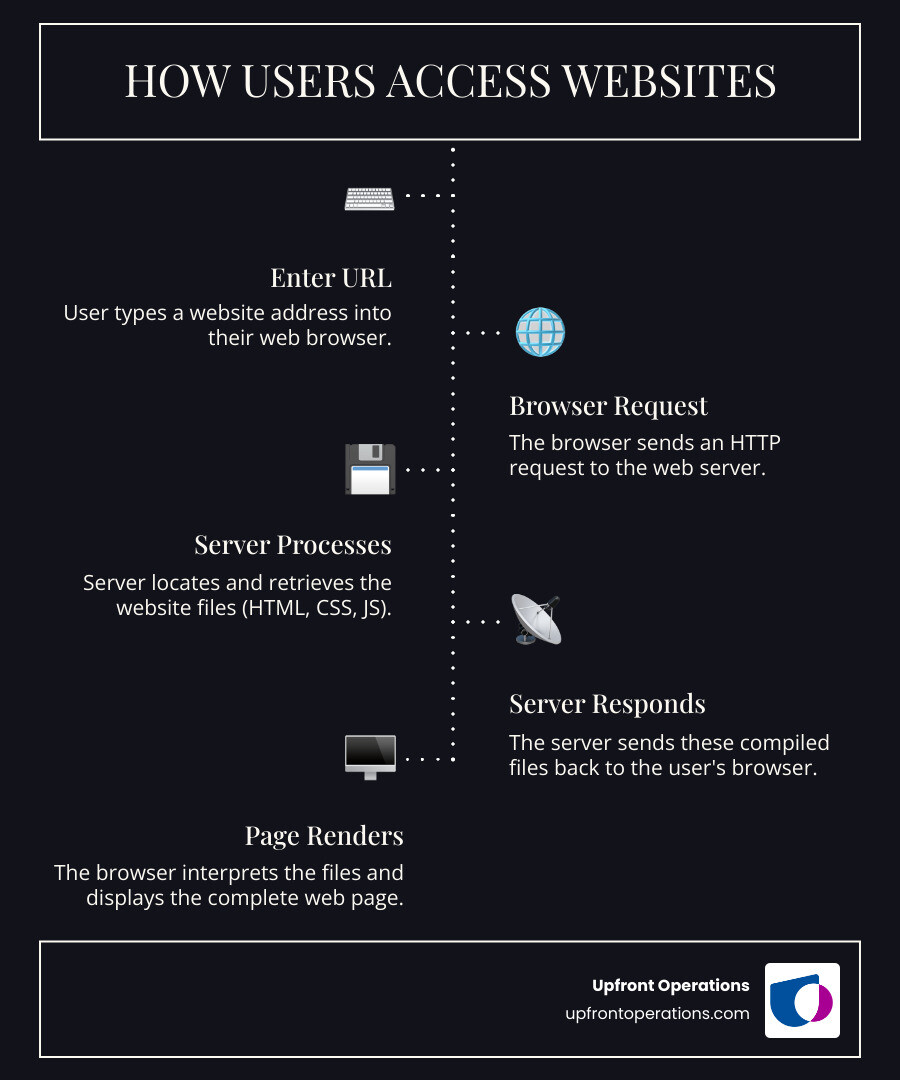
Accessing a website might seem like magic, but it’s a well-orchestrated dance between several technologies. Here’s a simplified look at how it works:
URL Entry: It all starts when you, the user, type a URL (Uniform Resource Locator) like "www.google.com" into your web browser's address bar or click a link.
Browser Request: Your browser then acts as a messenger, sending a request across the internet to the web server where that website is hosted. This request uses the HTTP protocol (or HTTPS for secure connections).
Server Response: The web server receives the request, locates all the necessary files that make up that specific web page (HTML, CSS, JavaScript, images, etc.), and sends them back to your browser.
Rendering the Page: Your browser takes these files and "renders" them, meaning it interprets the code and displays the visual content—text, images, layouts—on your screen. It’s like an architect reading blueprints and constructing a building for you to see.
This process happens in milliseconds, whether you're accessing websites on a desktop computer, a laptop, a tablet, or a smartphone. The trend of responsive design, which emerged in the 2010s, ensures that websites adapt their layout to provide the best viewing experience, regardless of the device you're using. This device-based layout is crucial for user satisfaction and engagement in today's multi-device world.
The journey of websites mirrors the incredible evolution of the internet itself. It all began in 1989 when Tim Berners-Lee, a British computer scientist, created the World Wide Web. His vision was a global information space where documents could be linked together, making knowledge universally accessible. Just a few years later, on April 30, 1993, CERN announced that the World Wide Web would be free for anyone to use—a pivotal moment that releaseed its potential.
In those early days, websites were a rarity. Netcraft reported just 19,732 websites in August 1995. Fast forward to February 2009, and that number had exploded to over 215 million. By October 2014, the world crossed the billion-website mark, and this figure continued to grow, reaching over 1.2 billion sites by April 2021. However, it's worth noting that an estimated 85 percent of all websites are inactive, a testament to the ever-changing digital landscape.
The earliest websites were predominantly static. A static website is exactly what it sounds like: its web pages are stored on the server in a fixed format, and they display the exact same information to every visitor, every time. Think of it like a digital brochure. The content doesn't change unless a developer manually updates the underlying HTML and CSS files.
These sites are generally built with simple HTML and CSS, and sometimes include server-side includes (SSI) for small pieces of dynamic content like a current date. They're straightforward to create, fast to load, and require minimal maintenance, making them ideal for informational purposes where content rarely changes, such as a company's "About Us" page or a personal portfolio. For small businesses and solopreneurs in New York looking for an affordable and reliable online presence, a well-designed static website can be a perfect starting point, providing a professional look without the complexities of dynamic systems.
As technology advanced, so did the capabilities of websites. Enter the dynamic website, a game-changer for interactivity and personalization. Unlike their static counterparts, dynamic websites can change or customize themselves frequently and automatically. This magic happens through server-side programming languages, with PHP being a dominant force, used by 73.0% of websites for server-side programming. Other languages like Java, Python, and Ruby also play significant roles.
Dynamic pages are generated "on the fly" by server-side code, often pulling information from databases. This allows for:
The shift from static to dynamic websites marked a profound evolution, changing the web from a collection of digital documents into a vibrant, interactive platform.
Here's a quick comparison to help you grasp the difference:
| Feature | Static Websites | Dynamic Websites |
|---|---|---|
| Content | Fixed, same for all visitors | Changes based on user interaction, database, or time |
| Update Method | Manual editing of files | Automated via database or server-side scripts |
| Complexity | Simpler, fewer components | More complex, involves databases and server-side logic |
| Technologies | HTML, CSS, sometimes SSI | HTML, CSS, JavaScript + Server-side languages (PHP, Python, Ruby) and databases |
| Use Cases | Brochures, portfolios, simple informational sites | E-commerce, social media, blogs, web applications, personalized dashboards |
| Maintenance | Low | Higher, requires database and application management |
In today's interconnected world, a website is more than just an online address; it's a critical asset for both business and personal endeavors. For us at Upfront Operations, we see websites as the engine of growth, especially for businesses in New York looking to expand their reach and streamline operations.

For businesses, websites are indispensable tools for growth, offering avenues that traditional brick-and-mortar operations simply can't match.
Lead Generation: Your website can be a powerful lead magnet. Through well-crafted content, engaging calls-to-action, and strategically placed forms, it can capture contact information from interested prospects. For B2B businesses, this is crucial. Traditional B2B prospecting often relies on static lists and cold outreach, which is increasingly ineffective. Modern strategies, heavily supported by websites, focus on "warm outbound"—identifying buyer intent signals from website visits, ad engagement, or even community discussions. Tools like Vector can de-anonymize website traffic, identifying which companies are visiting your site, turning anonymous visits into actionable leads. This intent-based approach is key to filling your pipeline with qualified prospects.
Showcasing Products and Services: An e-commerce website allows businesses to sell products directly to customers 24/7, reaching a global audience far beyond their physical location. Even for service-based businesses, a website acts as a comprehensive digital catalog, presenting offerings with rich descriptions, images, and testimonials.
Building Customer Relationships: Through blogs, FAQs, customer support portals, and interactive features, websites foster engagement and build trust. They provide a platform for educating your audience, answering their questions, and establishing your brand as an authority. For our clients in New York, we emphasize the importance of a user-friendly website that serves as a hub for both prospects and existing customers, enhancing their overall experience.
Brand Credibility and Awareness: A professional website lends credibility to your business, establishing your brand's legitimacy and expertise. It's often the first impression a potential customer has, and a well-designed site can significantly influence their perception.
Freemium and Subscription Models: Many websites leverage freemium models, offering basic content or services for free while charging for premium features or ad-free experiences. Subscription models provide recurring revenue, common in news, streaming, or SaaS (Software as a Service) platforms.
At Upfront Operations, we provide essential microservices like small business website hosting, ensuring that businesses in New York, from solopreneurs to growing firms, have a robust online foundation to implement these growth strategies. Our goal is to help you transform your website from a passive asset into an active revenue generator. More info about our services
When we look at the most-visited websites globally, names like Google, YouTube, and Facebook consistently dominate. What makes them so successful, and what lessons can we learn for our own digital endeavors?
These platforms excel because they provide immense value, offer intuitive user experiences, and benefit from strong network effects, where the value of the service increases as more people use it.
Here's a look at some common business models that drive the success of many websites:
Creating and maintaining a successful website involves more than just putting content online; it requires strategic planning, thoughtful design, and ongoing optimization. Whether you're a small business in New York or a solopreneur, your website needs a blueprint for success.
The foundation often starts with a Content Management System (CMS) like WordPress, or user-friendly website builders like Wix or GoDaddy Airo™. These platforms simplify the technical aspects, allowing you to focus on content and design. Responsive design is no longer a luxury but a necessity, ensuring your site looks great and functions perfectly on any device. Furthermore, a strong content strategy is vital, guiding what information you present and how it serves your audience. For those interested in the underlying principles, exploring Web standards from the W3C can offer valuable insights.
The visual appeal and ease of use of your website are paramount.
Building a beautiful website is only half the battle; people need to find it! This is where Search Engine Optimization (SEO) comes into play. SEO involves optimizing your website to rank higher in search engine results, driving organic traffic.
A key concept in SEO is Domain Authority (DA). Developed by Moz, DA is a link-based metric that predicts how well a website will rank on search engine result pages. It's measured on a scale from 1 to 100, with higher scores indicating a greater ability to rank. The Moz Top 500 list showcases websites with the highest Domain Authority, often reaching scores of 100, like google.com, youtube.com, and blogger.com, all with millions of linking root domains.
How is DA measured? It's primarily influenced by the number and quality of "linking root domains"—unique websites that link back to your site. A strong backlink profile from reputable sources signals to search engines that your website is authoritative and trustworthy.
To improve your website's SEO and Domain Authority:
For small businesses and solopreneurs in New York, understanding and implementing SEO best practices is vital for standing out in a crowded digital marketplace. Our on-demand website services at Upfront Operations include guidance on foundational SEO principles to help your site gain visibility.
We often encounter common questions about websites as businesses and individuals steer the digital world. Let's address some of them head-on.
The number of websites has seen astronomical growth since the internet's inception. As of April 2021, there were over 1.2 billion sites across 10,939,637 web-facing computers. This number has steadily climbed from just 19,732 websites in August 1995 to over 215 million in February 2009, and crossing the 1 billion mark by March 2016. However, it's important to note a significant detail: an estimated 85 percent of all websites are inactive. This means that while the sheer volume is staggering, a large portion of these digital spaces are no longer actively maintained or accessible, reflecting the dynamic and sometimes ephemeral nature of the World Wide Web.
This is a common point of confusion, but the distinction is quite simple! A web page is a single document or file displayed in a web browser. Think of it as a single page in a book. It has its own unique URL (address) and contains specific content, like an "About Us" page or a "Contact" page.
A website, on the other hand, is a collection of multiple, related web pages that are all grouped together under a single domain name. Using our book analogy, the website is the entire book, comprised of many individual pages. The "home page" is typically the main entry point to a website, serving as the cover and table of contents. So, while you visit web pages, you are browsing a website.
Yes, absolutely! There are several platforms that allow you to create websites for free, making it accessible for individuals and small businesses to establish an online presence without an initial financial investment. Popular options include Wix, Google Sites, and WordPress.com (the free tier).
However, these free options usually come with certain limitations:
For those in New York starting their entrepreneurial journey or running a small business, a free website can be a great way to test the waters. However, as your business grows and your needs become more sophisticated, investing in a professional, custom-domain website with dedicated hosting (like our on-demand small business website hosting services at Upfront Operations) often becomes a necessary step to improve credibility, gain full control, and open up greater growth potential.
From its humble beginnings as an abstract idea in 1989 to the busy digital metropolis of over a billion websites today, the World Wide Web has fundamentally reshaped how we live, work, and connect. We've journeyed from simple static pages, much like digital brochures, to complex dynamic platforms that personalize our every interaction. This evolution has transformed the website from a mere information display into an indispensable, powerful tool for individuals and businesses alike.
For businesses, especially those navigating the competitive landscape of New York, a website is no longer optional; it's a strategic imperative. It's your digital storefront, your lead generation engine, your customer relationship manager, and your brand's most visible ambassador. Understanding its components, historical development, and the strategies for leveraging it effectively is key to open uping growth.
At Upfront Operations, we believe in empowering businesses with the tools they need to succeed online. That's why we offer essential and simple microservices, including on-demand small business website hosting and business email, designed to give solopreneurs and small businesses the professional online presence they deserve. We aim to surpass the value of traditional agencies by providing targeted, effective solutions that boost your digital presence and optimize your sales operations.
Whether you're looking to establish your first online presence or optimize an existing one, your website is a living, breathing entity that, with the right care and strategy, can become your most powerful asset.