March 13, 2026

10
min read
The Paperless Path: Unlocking Client Portals for Document Management
Discover secure client portal for documents: end email chaos, boost efficiency, ensure compliance with encryption & e-sign...
Discover secure client portal for documents: end email chaos, boost efficiency, ensure compliance with encryption & e-sign...
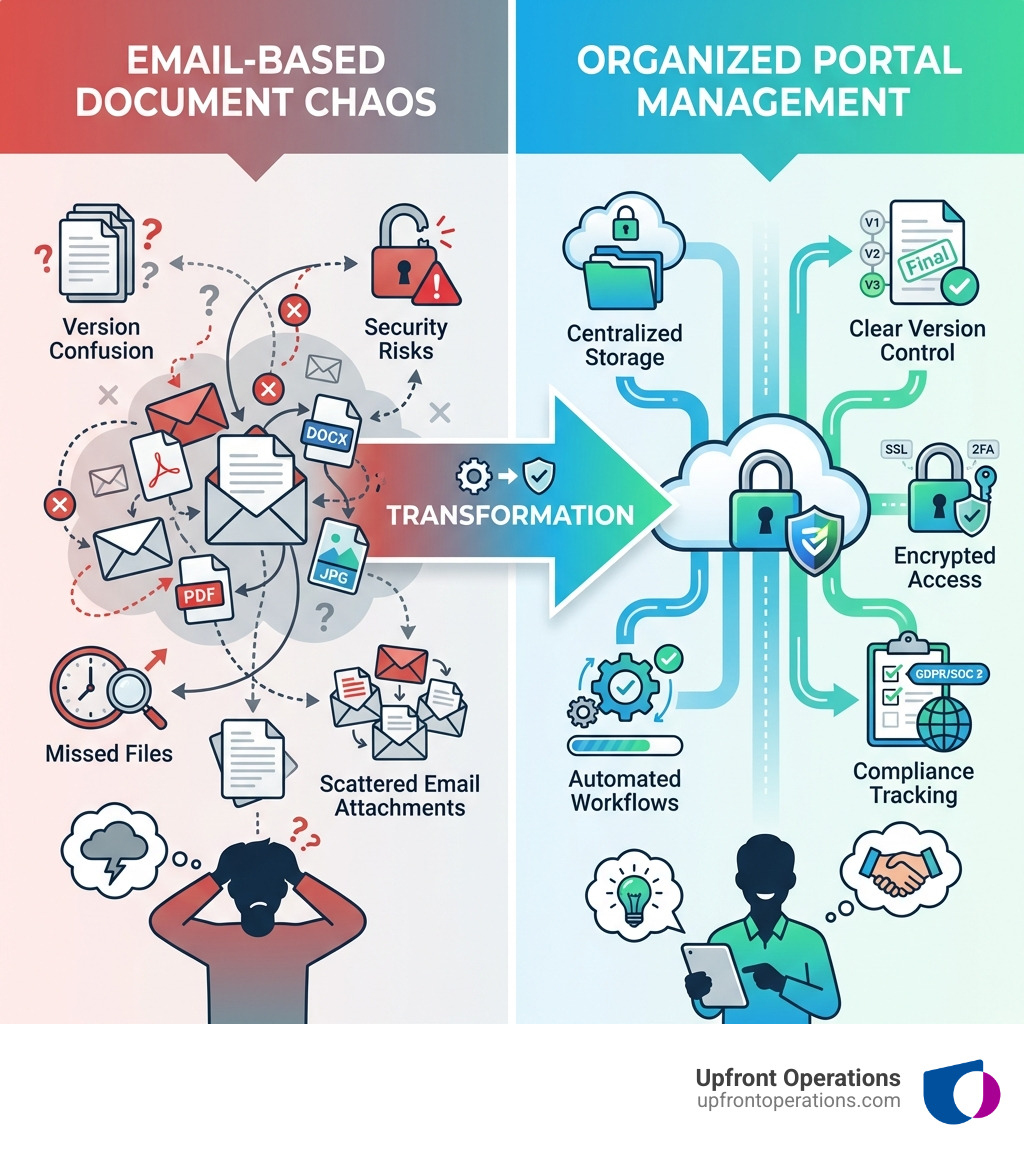
A client portal for documents is a secure digital platform that enables businesses to share, store, and manage files with clients in one centralized location. Instead of relying on email attachments or shared drives, these portals provide encrypted access, version tracking, automated notifications, and compliance tools that protect sensitive information while streamlining workflows.
Key benefits of implementing a client portal for documents:
Still managing processes over email? You're not alone, but you're facing unnecessary risk. When 1 in 4 data breaches occur via email, continuing to share sensitive client documents through your inbox isn't just inefficient—it's a liability waiting to happen.
The shift to client portals represents more than just adopting new technology. It's about creating a digital gateway that transforms how documents move through your business. Instead of fragmented email threads, missing attachments, and endless "Did you get my file?" messages, a client portal establishes a single source of truth where every document lives, every action is tracked, and every stakeholder knows exactly what's needed.
Consider the financial institution that reduced onboarding time by 50% after centralizing client document exchange within a portal. Or the accounting firms that now handle tax season with confidence, knowing their 500 million stored documents are audit-ready and compliant. These aren't outliers—they're examples of what becomes possible when you replace chaos with structure.
I'm Ryan T. Murphy, founder of Upfront Operations, and over the past 12 years I've helped 32 companies streamline their operations by implementing smart systems that eliminate wasted time and unlock revenue. Throughout my work with businesses implementing client portals for documents, I've seen how the right platform transforms not just document management, but entire client relationships.
Essential Client portal for documents terms:
Think of a client portal for documents as a high-tech, digital assistant that never sleeps. Its primary purpose isn't just to hold files; it’s to orchestrate the entire lifecycle of a document—from the moment a request is sent to the final e-signature and secure storage.
Unlike a standard cloud drive, a robust portal offers a branded user interface that makes your clients feel like they are entering a private, professional office. It provides a centralized hub where users can find exactly what they need without digging through their "Downloads" folder for the fifth time today.
Key functionalities include:
For small businesses and solopreneurs in New York, we often see that the biggest hurdle to growth is administrative friction. If you’re spending hours every day just trying to get documents from point A to point B, you aren't scaling. This is why we offer on-demand microservices to help you set up the digital infrastructure needed to automate these tasks.
The statistics are sobering: 91% of cyber attacks start as a phishing attack, and 1 in 4 data breaches occur via email. When you send a sensitive tax document or a legal contract via a standard email attachment, you are essentially sending a postcard through the mail—anyone with the right tools can read it.
A client portal for documents moves the conversation from an open, vulnerable channel (email) to a closed, fortified environment. Beyond security, there is the issue of organization. When documents are scattered across email threads and local drives, files go missing, and deadlines are missed. A portal ensures that both you and your client have a clear "To-Do" list, cutting through the noise of a busy inbox.
Furthermore, for businesses operating globally or within the EU, following the latest security standards for data transfer is not optional—it's a legal requirement.
When choosing a solution, you'll generally encounter three types of architectures:
For most of our clients, cloud-based portals are the gold standard because they offer seamless remote access and mobile compatibility, allowing a client in a New York coffee shop to approve a document on their phone just as easily as they could from a desktop.
| Feature | Email Attachments | Client Portal |
|---|---|---|
| Security | Low (Phishing risk) | High (Encryption/MFA) |
| File Size Limit | Usually 25MB | Up to 5GB+ |
| Organization | Fragmented threads | Centralized hub |
| Audit Trail | Manual/Non-existent | Automated logs |
| Branding | Minimal | Fully Customizable |
A robust client portal for documents must be more than just a "pretty face." It needs to be a fortress. When we evaluate portal software for our New York clients, we look for "bank-level" security. This isn't just a marketing term; it means using AES 256-bit encryption for data at rest and SSL/TLS for data in transit.
Essential security features include:
In highly regulated sectors, the portal must act as your compliance officer. Whether you are dealing with GDPR for European clients, HIPAA for healthcare data, or ITAR for defense-related documents, your portal should offer dedicated compliance centers.
For example, many top-tier portals now include specific tabs for monitoring Standard Contractual Clauses for EU data, ensuring that international data transfers meet strict GDPR requirements. In the U.S., accounting firms must also ensure they meet IRS 4457 and FTC Safeguards to protect taxpayer information.
Efficiency isn't just about working faster; it's about working smarter. Research shows that users save an average of 10.5 hours per week per user after implementing a document portal. How? By automating the "nags."
Instead of you having to remember to email a client every Tuesday to ask for their ID, the portal sends automated reminders. Real-time feedback allows you to comment directly on a document, and activity streams give you an instant "at-a-glance" view of what has been submitted and what is still outstanding. Instant notifications mean you can jump on an approval the second it happens, rather than finding it in your inbox three hours later.
The real magic happens when you move from simple storage to active workflow orchestration. A modern client portal for documents uses an "Invites" system. Instead of asking for "some documents," you send a structured package of requests. The client sees exactly what they need to provide—a photo of their ID, a signed contract, and a bank statement.
This workflow often includes:
Your brand is your promise. If a client is redirected to a generic-looking file site, it erodes trust. That's why white-labeling is a critical feature. You should be able to use your own custom domain (e.g., portal.yourbusiness.com), your own custom logos, and your brand colors.
This level of brand consistency extends to email notifications and even the language used in the portal. It presents a professional image that tells your clients, "We take your business—and your data—seriously."
While almost any business can benefit, certain industries find a client portal for documents to be a total game-changer:
Email is inherently fragmented. Files get buried in long threads, attachments are often too large (over 25MB), and security is a major vulnerability. A portal provides centralized tracking, supports massive files (up to 5GB per file), and ensures that the "Final Version" is always the one everyone is looking at.
Yes! Most modern portals use responsive design or offer white-label mobile apps. This allows clients to receive mobile push notifications and even use their smartphone camera to "scan" and upload documents directly into the portal while they are on the go.
With rapid deployment features, you can generate a new client portal in seconds. By using template replication or duplicate groups, you can set up a standardized folder structure and request list for every new client automatically.
At Upfront Operations, we believe that your time should be spent closing deals and scaling your business, not chasing down missing PDF attachments. Whether you are a solopreneur in New York needing a simple business email setup or a larger firm looking for elite pipeline optimization, a client portal for documents is an essential piece of the puzzle.
By moving away from the "email chaos" and embracing a secure, branded, and automated document workflow, you protect your business, delight your clients, and reclaim hours of your week.
Ready to stop the paper chase? Start supercharging your operations today and discover how simple, on-demand microservices can transform your professional image and your bottom line.