January 21, 2026

10
min read
UX-cellent Examples: Discovering Top Websites with Stellar User Experience
Discover 5 great user experience websites like Stripe & Airbnb. Learn UX secrets, avoid pitfalls, and boost your site's pe...
Discover 5 great user experience websites like Stripe & Airbnb. Learn UX secrets, avoid pitfalls, and boost your site's pe...

Great user experience websites aren't just visually appealing—they're conversion machines that turn casual browsers into loyal customers. If you're wondering which sites set the gold standard, here are the standout examples and what makes them exceptional:
The business case for stellar UX is compelling. Studies show that around 11% of users abandon their purchase after being asked for too much information upfront. Meanwhile, websites that prioritize intuitive navigation, fast performance, and personalized experiences see higher conversion rates, increased customer loyalty, and reduced support costs.
But what exactly transforms a functional website into a UX powerhouse? It's the thoughtful combination of usability, functionality, and visual design working together to create seamless digital journeys. From whitespace that guides the eye to navigation that follows the three-click rule, every element serves a purpose.
For mid-sized businesses struggling with inconsistent conversions and manual processes, investing in UX isn't optional—it's essential. When your website lets users find what they need instantly and complete actions effortlessly, you're not just improving metrics. You're building a competitive advantage that compounds over time.
I'm Ryan T. Murphy, founder of Upfront Operations, and over the past 12 years I've helped 32 companies redesign their digital experiences—including website rebuilds that increased traffic 10X and shortened sales cycles by 17%. Throughout my work with great user experience websites, I've seen how smart design decisions open up millions in new revenue without requiring massive teams or budgets.
At Upfront Operations, we often encounter a common misconception: that User Experience (UX) and User Interface (UI) are interchangeable. While closely related, they serve distinct purposes in crafting great user experience websites. Think of it this way: UI is the car's dashboard—the buttons, screens, and aesthetic appeal you interact with. UX, on the other hand, is the entire driving experience—how smooth the ride is, how easy it is to find your way, and whether you arrive at your destination feeling satisfied or frustrated.
UI design focuses on the visual and interactive elements of a website—the layout, graphics, colors, typography, and overall look and feel. It's about making the site beautiful and engaging. UX design, however, digs deeper into how users interact with the website. It considers user behavior, site functionality, and content relevance, aiming to make every interaction smooth, logical, and enjoyable. As one expert puts it, "Much of website design is an exercise in UX design — each web page becomes a step in a carefully planned journey." Bad design creates dead ends, while good UX design drives every interaction toward an intended goal.
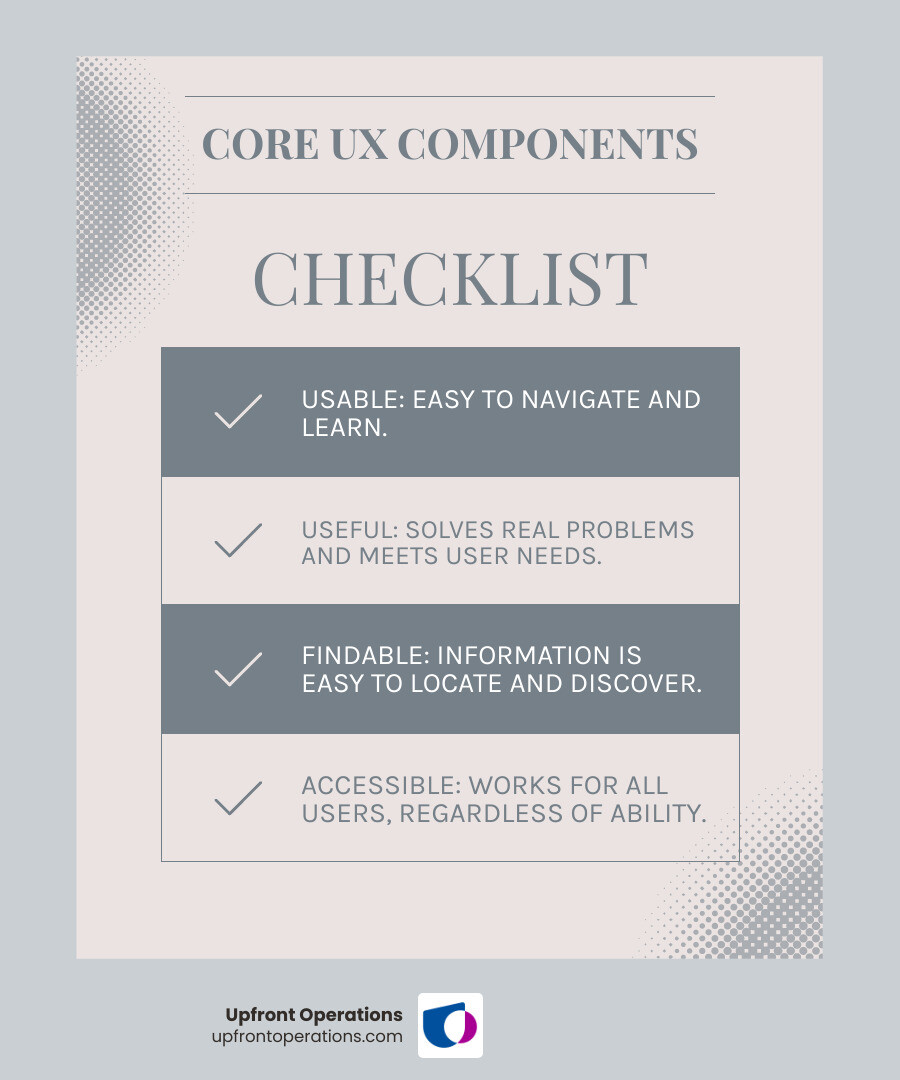
Usability is paramount. A website must be intuitive and easy to understand. We believe customers should be able to access important pages in three clicks or less. If users have to hunt for information, they're likely to leave. This means clear labeling, logical grouping of content, and predictable interactions. Our goal at Upfront Operations is always to minimize user friction, making it effortless for visitors to find what they need or complete a desired action.
Beyond just looking good, a great user experience website must function flawlessly. This includes ensuring all links work, forms submit correctly, and interactive elements respond as expected. Functionality means the products, services, or interfaces fulfill their intended purpose with minimal distractions. It's about delivering on the promise of the design.
Ever waited impatiently for a page to load? You're not alone. Slow-loading pages are a major source of frustration and can negatively impact a website's search rankings. Our research shows that a responsive site improves SEO, improves usability, and future-proofs your design across evolving screen sizes. Optimizing site performance by improving page load times through techniques like lazy loading (where images only load as they come into view) and content delivery networks (CDNs) is critical for user satisfaction. Nobody likes a slowpoke!
Visual design is more than just aesthetics; it's a powerful tool for guiding user attention and evoking emotion.
Your website's content must resonate with your audience. As one source aptly puts it, "Your company is selling to end-users, so your website needs to speak to them, not just talk about yourself." This means tailoring content to align with user needs and preferences, using a well-structured hierarchy and engaging visuals. Whether it's concise product descriptions or informative blog posts, content should be scannable, contextual, and valuable. We help businesses in New York craft content that converts by truly understanding their local audience and what drives them.
Navigation is the GPS of your website. Efficient site navigation minimizes user friction and enables users to find information with less effort. This brings us back to the three-click rule: users should ideally reach their destination within three clicks. Highly accessible navigation menus, mega menus for complex sites, and sticky navigation (menus that stay visible as you scroll) all contribute to a seamless user journey.
A truly great user experience website is accessible to everyone, regardless of ability. This means designing for users with visual, auditory, or motor impairments. Implementing the Web Content Accessibility Guidelines (WCAG) is not just a best practice; it's often a legal requirement and always the right thing to do. Features like high color contrast, descriptive alt text for images, keyboard navigation, and appropriately sized interactive elements ensure inclusivity. Even simple additions like a dark mode toggle, as seen on Semrush's blog, can reduce eye fatigue and improve accessibility for visually impaired users.

We've scoured the digital landscape to bring you five exemplary great user experience websites that truly stand out. These aren't just pretty faces; they're carefully designed platforms that prioritize the user at every turn.
These websites share common threads that lift them above the rest:
Let's explore the specifics!
Stripe, the online payment processing platform, is often considered the 'North Star' for user experience and web design, especially when it comes to subtle yet impactful details.
Key takeaway: Small details matter! Thoughtful micro-interactions can significantly improve user engagement and make digital interactions smoother.
Airbnb revolutionized the travel industry by putting user experience at its core, particularly with its booking system and visual presentation.
Key takeaway: For services involving complex decisions, break down processes into simple steps and use visuals and social proof to build trust.
Nike's online presence is a masterclass in creating an immersive and personalized shopping experience for a global audience.
Key takeaway: Leverage high-quality visuals, offer customization, and provide robust filtering to create an engaging and efficient e-commerce experience.
Duolingo has cracked the code on making language learning enjoyable and addictive through brilliant UX design principles.
Key takeaway: Gamification and instant, positive feedback can transform complex or tedious tasks into engaging and motivating experiences.
Headspace, the meditation and mindfulness app, exemplifies how a calming aesthetic can be paired with exceptional usability and accessibility.
Key takeaway: A harmonious visual design, combined with clear categorization and strong accessibility, can create a deeply engaging and user-friendly experience, especially for sensitive topics.
From these examples, we can distill some universal truths about crafting great user experience websites:
Even with the best intentions, it's easy to stumble into common UX pitfalls that can deter visitors and undermine your website's effectiveness. At Upfront Operations, we've helped countless businesses in New York steer these challenges to build great user experience websites.
One of the quickest ways to frustrate a user is to make them feel lost. If your navigation is unclear, inconsistent, or buries important links too deeply (remember the three-click rule!), users will simply give up. Imagine trying to find a specific item in a disorganized store – you'd probably leave.
How to avoid it: Prioritize intuitive navigation. Use clear, concise labels, consistent menu structures, and consider features like mega menus for larger sites or sticky navigation for easy access. Map out your user journeys to ensure logical pathways.
We've all been there: staring at a spinning wheel, waiting for a page to load. Studies confirm that slow-loading pages lead to higher bounce rates and unhappy users. It's a critical performance issue that impacts both user satisfaction and search engine rankings.
How to avoid it: Optimize your images (compress them!), leverage browser caching, minimize code, and consider a Content Delivery Network (CDN). For our clients, we often implement lazy loading for images and videos to ensure pages load swiftly, especially on mobile devices.
In today's multi-device world, a website that doesn’t adapt to different screen sizes leaves potential visitors behind. If your site looks great on a desktop but is tiny and unreadable on a smartphone, you're alienating a huge portion of your audience.
How to avoid it: Implement responsive web design. This means your website will automatically adjust its layout, images, and text to fit any screen size, from large monitors to tablets and smartphones. A mobile-first approach, where you design for the smallest screen first and then scale up, is often the most effective strategy.
While pop-ups can be effective for lead capture, poorly implemented ones are a major annoyance. We've seen studies indicating that around 11% of users abandon their purchase after being asked for too much information upfront, often via an ill-timed pop-up. Nothing says "go away" like a giant, unclosable modal blocking the content you came to see.
How to avoid it: Use pop-ups sparingly and strategically. Consider exit-intent pop-ups (that appear when a user is about to leave), time-delayed pop-ups (after a user has engaged for a bit), or subtle slide-ins. Always make them easy to close and ensure they don't cover essential content.
Presenting too much information at once can overwhelm users and make your site feel cluttered. This often happens when there's a lack of visual hierarchy or too little whitespace.
How to avoid it: Break down content into digestible chunks. Use headings, subheadings, bullet points, and short paragraphs. Employ ample whitespace to give elements room to breathe. Focus on telling a clear story and guiding the user's eye to the most important points.
Imagine a website where every page has a different font, color scheme, or button style. It would feel unprofessional and untrustworthy. Inconsistent design creates a jarring experience and makes it harder for users to learn how to interact with your site.
How to avoid it: Establish a strong brand style guide and stick to it. Ensure consistent use of colors, typography, imagery, and UI elements across all pages. This builds brand legitimacy and makes your site feel cohesive and reliable.
If users can't easily read your text, they won't engage with your content. This includes issues like small font sizes, low contrast between text and background, or overly complex fonts.
How to avoid it: Choose readable fonts and ensure sufficient font size. Maintain high contrast between text and background colors. Limit line length to 50-75 characters for optimal readability.
We've explored what truly defines great user experience websites, diving into the intricate dance between UI and UX, the critical role of performance and accessibility, and learning from some of the best in the business. From Stripe's subtle micro-interactions to Duolingo's engaging gamification, the common thread is a deep understanding of user needs and a commitment to crafting seamless digital journeys.
Prioritizing UX isn't just about making a pretty website; it's a strategic investment that yields tangible business benefits. It reduces user friction, increases profitability through higher conversion rates, minimizes the need for extensive customer support, and fosters improved customer loyalty. When your site's user journey caters to individual needs and preferences, you forge a stronger connection with your audience.
At Upfront Operations, we understand that building a great user experience website can seem daunting, especially for small businesses and solopreneurs who need to make every dollar and minute count. That's why we offer essential and simple microservices on-demand, like professional website design and business email setup. We help businesses in New York launch and maintain high-performing, user-friendly websites without the overhead of traditional agencies. Our approach provides you with exactly what you need, when you need it, completely surpassing the value traditional agencies and freelance platforms provide.
Whether you're looking to launch your first site, revamp an existing one, or simply ensure your online presence is as effective as possible, we're here to help.
Ready to transform your online presence and provide an exceptional experience for your visitors?