February 14, 2026

10
min read
The Entrepreneur's Starter Pack: Affordable Email and Website Solutions
Launch your startup with a professional Business email address & website. Affordable, on-demand solutions to build trust a...
Launch your startup with a professional Business email address & website. Affordable, on-demand solutions to build trust a...


A business email address is a professional email that uses your company's custom domain name (like yourname@yourcompany.com) instead of a generic provider (like yourname123@gmail.com). Here's what you need to know:
The problem? Most entrepreneurs and small business owners struggle to look professional while keeping costs low. You need a business email and matching website, but traditional providers lock you into expensive monthly subscriptions with features you don't need. Agencies charge thousands upfront. Freelancers are hit-or-miss.
The solution exists. On-demand services let you get a professional business email address and simple website without the complexity or long-term commitments. You pay for what you need, when you need it. With Upfront Operations, that can mean starting with a single on-demand Business Email & Domain Setup microservice, then adding a One-Page Website or Landing Page Build only when you are ready to drive more leads.
I'm Ryan T. Murphy, founder of UpfrontOps, and over the past 12 years I've helped 32 companies build professional online presences by setting up business email address systems that integrate seamlessly with their sales and marketing operations. Whether you're launching your first venture or scaling an established business, the right business email address setup can save you hours of frustration while making you look instantly credible.
Common Business email address vocab:
Think of your business email address as your digital business card. It’s often the first point of contact a potential client or partner has with your company, and it speaks volumes before you even type a word. A generic email address, like rebecca.sparkles.2024@xyz.com, might accidentally convey a "side hustle" vibe, whereas rebecca@strategicgrowth.com instantly signals a serious business partner. This isn't just about looking good; it's about building foundational trust and credibility.

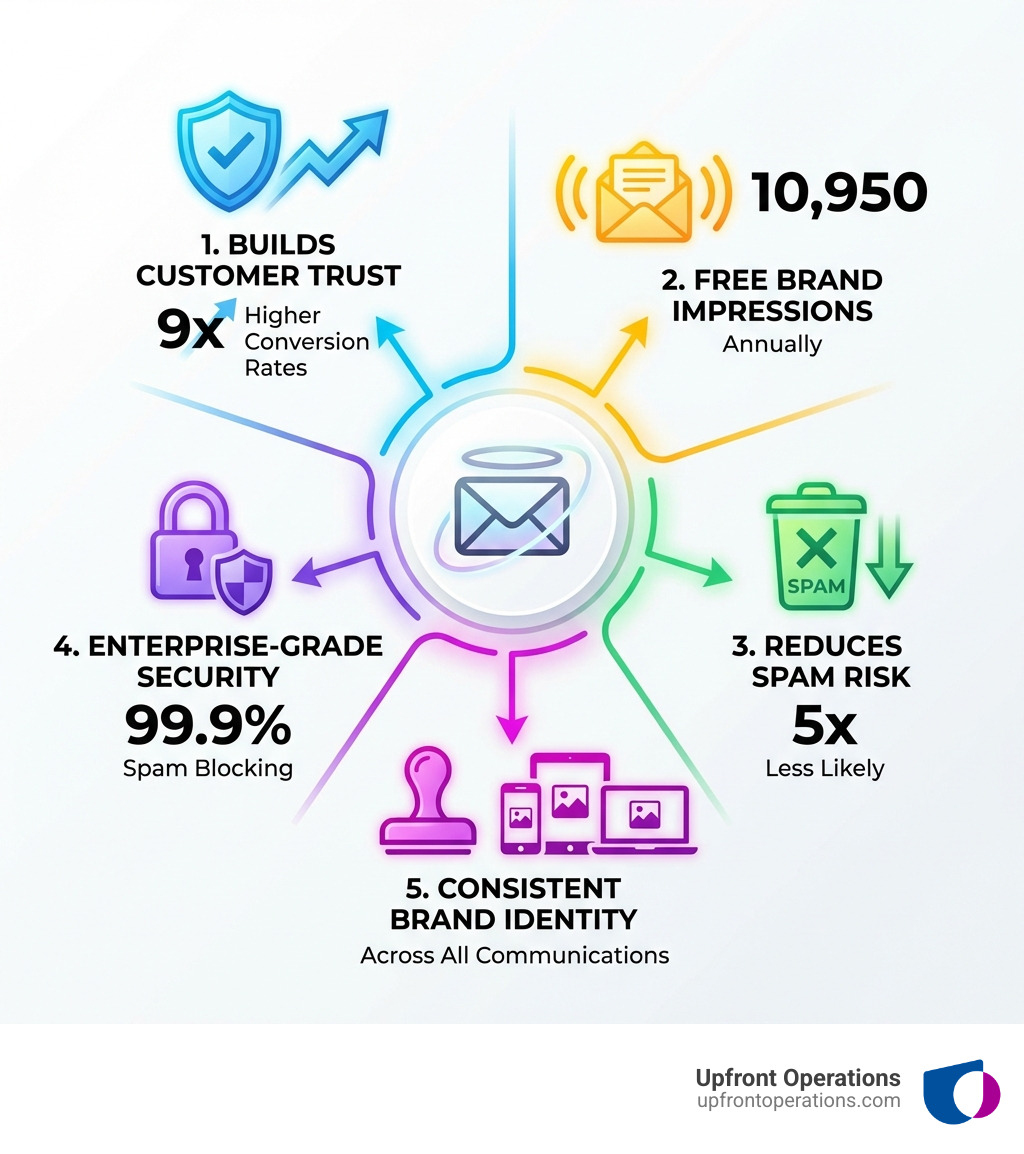
Our research shows that customers are a staggering 9 times more likely to choose a company with a professional email address. Why? Because it triggers "social proof"—it signals investment, professionalism, long-term planning, and attention to detail. It tells your audience that you’re serious about what you do, and you've put thought into your brand presence.
Beyond building trust, your business email address is a powerful, free marketing tool. Every email you send, whether it's a quick reply to a customer inquiry or a detailed proposal, carries your brand name. If you send just 30 emails a day, that's 30 brand impressions. Over a year, that adds up to 10,950 times someone sees your company name without you spending a single cent on advertising! It's like having a tiny billboard attached to every communication. This continuous reinforcement builds brand consistency and awareness, changing routine correspondence into proactive marketing.
What’s more, emails from professional domains get opened three times more often and are five times less likely to land in spam folders. This dramatically improves your chances of connecting with your audience, ensuring your important messages don't get lost in the digital abyss. For entrepreneurs and small businesses in New York looking to make a strong impression, a professional business email address isn't a luxury; it's a necessity. It’s an investment that pays dividends in credibility, marketing reach, and customer trust.
When it comes to selecting a business email address solution, entrepreneurs often face a dilemma: free versus paid services, or bundled suites versus more flexible, on-demand microservices. The right choice depends on your specific needs, budget, and how much control and functionality you require.
Free vs. Paid Services:While tempting, free email services (like a personal Gmail or Outlook account) lack the professionalism and features crucial for a growing business. They don't allow for a custom domain, which, as we've discussed, is a significant credibility booster. Paid services, on the other hand, offer custom domains, improved security, more storage, and often integration with other business tools. Many providers, like Google Workspace and Microsoft 365, offer free trials, allowing you to test the waters before committing.
Bundled Suites vs. Microservices:Traditional providers often offer extensive bundled suites, packing email with productivity apps, cloud storage, and collaboration tools. While comprehensive, these can be overkill and costly for a solopreneur or a small team just starting out. This is where our on-demand microservices come in. We offer essential services like business email address setup and simple website creation as standalone, affordable packages. You get exactly what you need, when you need it, without paying for features you won't use. This flexibility is ideal for managing budget constraints and scaling as your business grows. You can explore on-demand pricing options directly on our website.
Here’s a simplified comparison of popular options and our on-demand approach:
| Feature | Google Workspace (Paid) | Microsoft 365 (Paid) | On-Demand Microservices (Upfront Operations) |
|---|---|---|---|
| Best For | Collaboration-heavy teams, Google ecosystem users | Microsoft Office users, enterprise-focused businesses | Solopreneurs, small businesses, budget-conscious startups |
| Key Features | Custom domain email, 30GB+ storage, Meet, Docs, Drive | Custom domain email, 1TB+ storage, Office apps, Teams | Custom domain email, website setup, custom security |
| Pricing Model | Per user, monthly/annual subscriptions | Per user, monthly/annual subscriptions | Flat-rate for specific services, pay-as-you-go flexibility |
When evaluating a business email address provider, several key features stand out as non-negotiable for effective and secure communication:
These two giants dominate the business email and productivity suite landscape, each offering a comprehensive solution for your business email address and beyond.
Google Workspace (formerly G Suite) excels in its seamless integration with the Google ecosystem. If your team is already accustomed to Gmail, Google Docs, Sheets, and Drive, then Workspace provides a natural extension. It's built for real-time collaboration, allowing multiple users to work on documents simultaneously, making it a favorite for agile teams. Its strength lies in its cloud-native approach, ensuring access from anywhere, on any device. Google Workspace offers a 14-day free trial, allowing up to 10 users to test its capabilities, which is a great way to experience its collaborative power.
Microsoft 365 (formerly Office 365), on the other hand, is the go-to for businesses deeply integrated with Microsoft Office applications like Word, Excel, and PowerPoint. It provides the familiar desktop versions of these apps alongside cloud services. Microsoft Exchange, included in Microsoft 365 Business Basic, Standard, and Premium plans, offers robust email hosting with multi-factor authentication, advanced virus and malware protection, and custom email domains. Microsoft 365 offers a one-month free trial, often converting to a 12-month subscription. Its enterprise-grade features and familiar interface make it a strong contender for businesses prioritizing the Microsoft software suite.
Both platforms offer industry-leading security, substantial storage, and reliable uptime. The choice largely comes down to which ecosystem your business already uses or prefers, and whether your primary focus is on collaborative online documents (Google) or the traditional strength of desktop office applications (Microsoft). We can help you steer these choices and set up the ideal solution for your New York-based business, ensuring you maximize value without overspending.
Setting up a professional online presence, including your business email address and a simple website, might sound daunting, but it's a straightforward process, especially when you have the right guidance (or the right microservices!). We've streamlined it into three easy steps.
The first step is foundational: securing your digital identity.
info@yourcompany.com) and your website.We understand that for many entrepreneurs, especially those in New York, getting a domain and a basic website up quickly and affordably is a priority. That's why we offer on-demand website setup as a microservice. You don't need to spend thousands on a complex site; we can get you started with a professional landing page and your custom email. This package ensures you have an immediate, credible online presence. Get your on-demand website and email package today.
If you want to dive deeper into how domains work behind the scenes, the Domain Name System article gives a clear technical overview.
Once your domain is ready, it's time to configure your business email address. This involves updating some technical settings, which can be a bit tricky if you're not familiar with them, but we handle this for our clients.
your.name@yourdomain.com). A "user" is typically defined as one personalized email address, while group aliases (like sales@yourcompany.com) are usually included for free and don't count as additional users.While DNS changes can take up to 48 hours to fully propagate across the internet, they often work within a few hours. Setting up your business email, including domain verification and record configuration, usually takes between 15 to 60 minutes for most businesses. Our on-demand Business Email & Domain Setup microservice takes the technical headache out of this step, ensuring your email is set up correctly and securely from day one without you committing to a long-term contract or bloated software bundle.
With your business email address up and running, the final step is to organize and secure your communications effectively.
info@yourcompany.com, sales@yourcompany.com, or support@yourcompany.com. These aliases can forward to single or multiple team members' inboxes. For instance, designating multiple recipients for an info@ address ensures faster customer response times. We can help you set up these aliases, ensuring efficient handling of inquiries and even sharing credentials for a shared inbox (like info@) so employees can reply directly from that address, enhancing professionalism.By taking these steps, you not only ensure smooth operations but also safeguard your sensitive business communications. Our on-demand services include guidance and setup for these crucial organizational and security elements, and for growing teams we can layer in fractional Sales Operations & CRM Optimization support to connect your inbox, CRM, and pipeline so every qualified email turns into a tracked opportunity.
Once your business email address is set up, managing it effectively is key to maximizing its benefits, from bolstering your brand to streamlining your sales operations.
First, let's talk about your email signature. This isn't just a formality; it's a professional branding opportunity. A well-designed email signature should include your name, title, company name, website link, phone number, and perhaps social media links or a company logo. It reinforces your brand with every message, making it easy for recipients to connect with you. It's your digital handshake.
Next, consider the power of email automation. This refers to using software to send a series of emails automatically based on predefined triggers or actions. Email automation is vital for any company looking to increase personalization and consistency in customer interaction. It saves time and effort, ensures consistent messaging, and can lead to a higher ROI through analytics.
Examples of effective email automation include:
For businesses in New York, integrating your business email address with a CRM (Customer Relationship Management) system is a game-changer. This allows for seamless lead nurturing and pipeline optimization. For instance, a marketing-to-sales handoff can be actioned, enforced, and measured within platforms like HubSpot using lead status properties, custom fields, automations, reports, and dashboards. This means when a lead comes in via email, your sales team gets all the necessary context, and follow-up is automated and tracked, ensuring no opportunities fall through the cracks. This is an area where our expertise in on-demand Sales Operations Support and CRM Setup & Optimization truly shines, helping businesses close deals faster and scale with unstoppable momentum.
Maintaining brand consistency across all communications is crucial. This means using a consistent "from" address and domain, ensuring your email subject lines are clear and relevant, and designing email templates that reflect your brand's visual identity. If you are new to email marketing and automation, the overview on email marketing is a helpful primer on concepts and terminology you will see in common tools.
By implementing these best practices, your business email address becomes more than just a tool for sending messages; it becomes an integral part of your sales, marketing, and customer relationship strategy, backed by on-demand microservices you can spin up exactly when your business is ready for the next step.
Here are some common questions entrepreneurs ask about setting up and managing their business email address.
Creating departmental emails like info@yourcompany.com or sales@yourcompany.com is done through what are called email aliases (or sometimes group email addresses). These are not separate user accounts but rather forwarding addresses.
Here's how they work and their benefits:
@ sign.john.doe@yourcompany.com, jane.smith@yourcompany.com).info@ or sales@ address, making it appear that the reply came from the department rather than an individual. This typically involves sharing credentials for the alias or setting it up as a shared inbox in an email client.Benefits:
info@ email address, for example, ensures faster customer response times.info@ or contact@ serves as a clear point of contact for customers, simplifying the initial interaction and aiding in lead generation support.We can help you set up and manage these alias addresses as part of our microservices, ensuring your New York business communicates efficiently and professionally.
Absolutely, yes! In fact, using a domain name you already own is the most common and recommended approach for setting up a business email address. It maintains brand consistency and leverages an asset you already possess.
The process generally involves:
While these DNS changes can sound technical, they're essential. We simplify this process by handling all the technical configurations for you, ensuring your existing domain seamlessly integrates with your new professional business email address with minimal fuss.
The actual setup time for a business email address can vary, but generally, the configuration itself is quite quick.
To manage expectations, we often advise clients to plan for a few hours for initial functionality, and up to a day or two for complete global propagation. If you're migrating existing emails, contacts, and calendar events from another provider, that can add to the overall timeline, depending on the volume of data. Our on-demand services are designed to make this process as fast and efficient as possible, getting your New York business online with a professional business email address without unnecessary delays.
In today's competitive landscape, a professional business email address and a matching website are no longer optional—they are non-negotiable for building trust, establishing credibility, and projecting an image of professionalism. From acting as a constant marketing tool to safeguarding your communications, the benefits are clear.
For entrepreneurs and small businesses in New York, the challenge often lies in achieving this professional online presence affordably and without getting bogged down in technical complexities or expensive, oversized bundles. This is precisely where on-demand services shine. They offer the fastest, most affordable, and most flexible way to get started, allowing you to pay for precisely what you need, when you need it.
Upfront Operations is dedicated to providing simple, on-demand microservices that empower you to establish your professional online presence without the complexity of traditional providers. You can start small with a Business Email & Domain Setup, bolt on a One-Page Website or Landing Page Build when you are ready to capture leads, and then add fractional Sales Operations & CRM Optimization only when your pipeline demands it—all without locking into bloated retainers or long contracts.
Whether you need a custom business email address, a professional landing page, or expert sales operations support, we're here to help you make a powerful first impression and scale with unstoppable momentum.